Data Domain: Sådan geninitialiserer og renser du SDPM | NVRAM
Summary: Denne artikel beskriver, hvordan du renser og omkonfigurerer SDPM-indstillinger (Software Defined Persistent Memory) i BIOS og kontrollerer en vellykket initialisering, når systemet vender tilbage til DDOS. ...
This article applies to
This article does not apply to
This article is not tied to any specific product.
Not all product versions are identified in this article.
Instructions
Gælder for:
- DD9910, DD9410, DD6410, DD9910F systemer efter udskiftning af NVRAM-modul (VOSS).
- PowerProtect Data Domain-systemer, der bruger SDPM på et VOSS-modul.
- iDRAC-begivenhed:
SDPM7108 - Critical Diagnostic Event (Sanitize Required) - Alle understøttede softwareversioner (DDOS)
Påkrævede handlinger:
Geninitialiser SDPM:
- Genstart systemet.
- Få adgang til systemets BIOS <F2>: System-BIOS > Hukommelsesindstillinger > Permanent hukommelse
- Indstil Sanitize All NVDIMM er til
Enabled
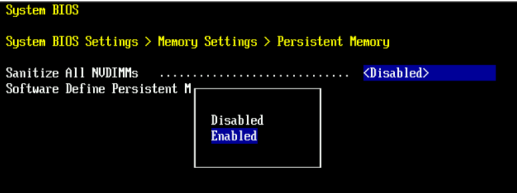
- Indstil SDPM-hukommelsesstørrelse til
32 GB
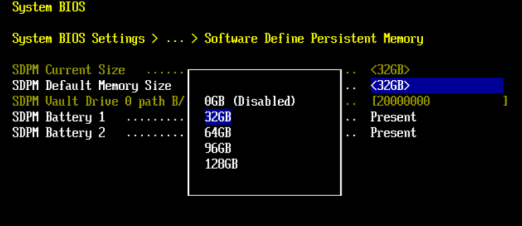
- Bekræft SDPM-rensning, og genstart.
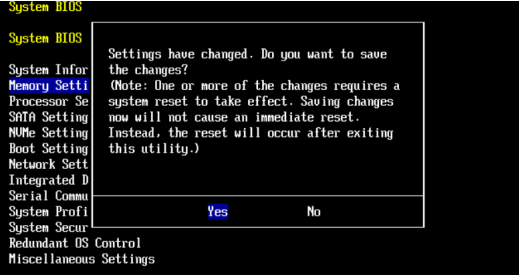
- Tillad systemet at genstarte til DDOS
- Bekræft SDPM ved at kontrollere, om der er NVRAM-fejladvarsler, og sikre, at filsystemet er aktiveret.
-
# alerts show current
-- There should be no outstanding alert relating to the NVRAM subsystem.
Caution: It may take one to two minutes for the system to clear the NVRAM failure alert.

# system show nvram
Note: The battery must be at least 80% charged for the file system to start.

# filesys status
-- The Filesystem should be Enabled & Running
-
Valideringstjekliste:
Bekræft følgende:
-
- SDPM-rensningen er fuldført.
- Der er ingen aktive NVRAM-relaterede advarsler.
- NVRAM-status rapporterer normalt.
- NVRAM-batteriet oplades mindst 80 %.
- Filsystemet viser "Aktiveret".
- Filsystemet kører.
Hvis et valideringstrin mislykkes, skal du indsamle en supportpakke og kontakte Dell Data Protection Support.
Additional Information
Disse handlinger kan også udføres i iDRAC:
Configuration > BIOS Settings > Memory Settings > Persistent Memory- Indstillinger:
Sanitize All NVDIMMs« til <ENABLED>- Sørg for, at "SDPM Default Memory Size" er indstillet til <
32GB> 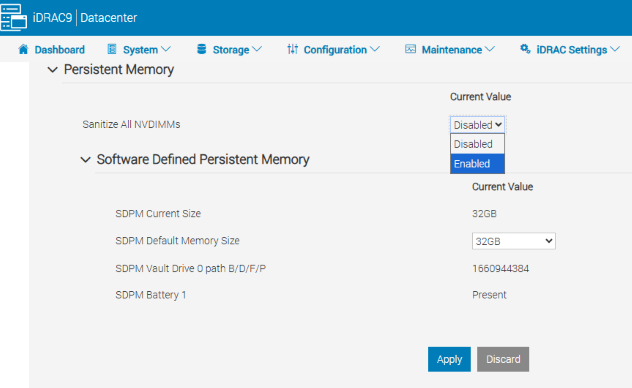
- Sørg for, at "SDPM Default Memory Size" er indstillet til <
- Vælg Anvend Derefter "OK".
- Vælg 'Ved næste genstart' (nederst på siden)
- Indstillinger:
- Fortsæt med at genstarte DD-enheden (f.eks. ved hjælp af DD-CLI:
#system reboot)
Referencer:
Data Domain: Sådan diagnosticeres og løses SDPM | NVRAM-advarsler
Data Domain: Advarsel om NVRAM-hardwarefejl | EVT-NVRAM-00201
iDRAC (v7.x) – Referencevejledning til fejl og hændelsesmeddelelser
Affected Products
Data Domain, DD6410 Appliance, DD9410 Appliance, DD9910 Appliance, DD9910F ApplianceProducts
Data Domain Deduplication Storage SystemsArticle Properties
Article Number: 000283787
Article Type: How To
Last Modified: 27 Jul 2026
Version: 2
Find answers to your questions from other Dell users
Support Services
Check if your device is covered by Support Services.