Data Domain: come reinizializzare e sanitizzare SDPM | NVRAM
Summary: Questo articolo descrive come sanificare e riconfigurare le impostazioni SDPM (Software Defined Persistent Memory) nel BIOS e verificare la corretta inizializzazione dopo che il sistema torna a DDOS. ...
This article applies to
This article does not apply to
This article is not tied to any specific product.
Not all product versions are identified in this article.
Instructions
Applicabile a:
- Sistemi DD9910, DD9410, DD6410 DD9910F dopo la sostituzione del modulo NVRAM (VOSS).
- Sistemi PowerProtect Data Domain che utilizzano SDPM su un modulo VOSS.
- Evento iDRAC:
SDPM7108 - Critical Diagnostic Event (Sanitize Required) - Tutte le versioni software supportate (DDOS)
Azioni richieste:
Reinizializzare l SDPM:
- Riavviare il sistema
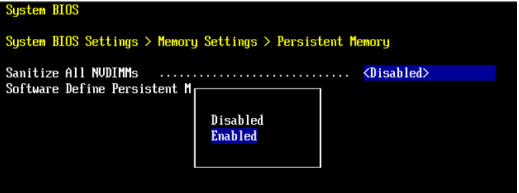
- Accedere al BIOS <di sistema F2>: BIOS > di sistema Impostazioni > di memoria Memoria persistente
- Impostare Sanitize All NVDIMM su
Enabled
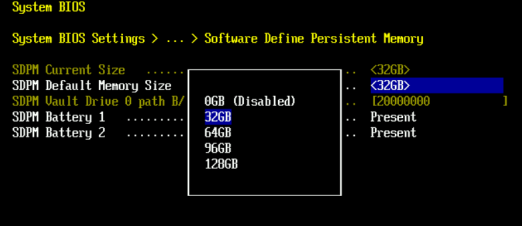
- Impostare SDPM Memory Size su
32 GB
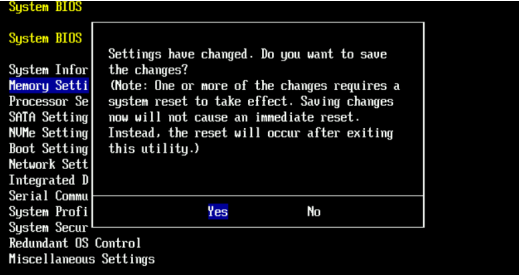
- Confermare la sanificazione dell SDPM e riavviare.
- Consentire al sistema di riavviare DDOS
- Verificare l SDPM controllando gli avvisi di errore della NVRAM e assicurandosi che il file system sia abilitato.
-
# alerts show current
-- There should be no outstanding alert relating to the NVRAM subsystem.
Caution: It may take one to two minutes for the system to clear the NVRAM failure alert.

# system show nvram
Note: The battery must be at least 80% charged for the file system to start.

# filesys status
-- The Filesystem should be Enabled & Running
-
Elenco di controllo di convalida:
Verificare quanto segue:
-
- Sanificazione SDPM completata correttamente.
- Non sono presenti avvisi attivi relativi alla NVRAM.
- Lo stato della NVRAM viene segnalato normalmente.
- La carica della batteria NVRAM è di almeno l'80%.
- Il file system non è abilitato.
- Il sistema DD esegue .
Se un passaggio di convalida ha esito negativo, raccogliere un pacchetto di supporto e contattare il supporto Dell Data Protection.
Additional Information
Queste azioni possono essere completate anche in iDRAC:
Configuration > BIOS Settings > Memory Settings > Persistent Memory- Settings (Impostazioni).
Sanitize All NVDIMMsAENABLED>- Assicurarsi che "SDPM Default Memory Size" sia impostato su <
32GB> 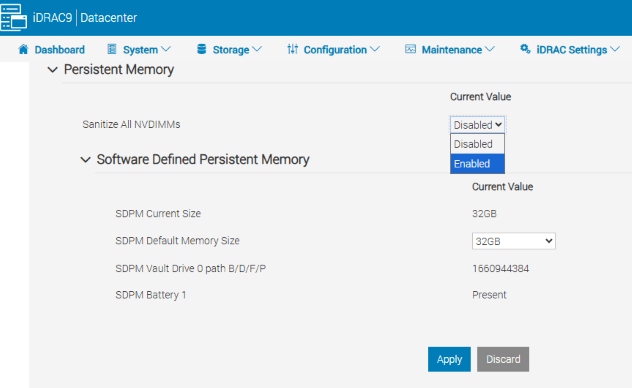
- Assicurarsi che "SDPM Default Memory Size" sia impostato su <
- Selezionare APPLY. Quindi, cliccare su "OK".
- Seleziona "Al prossimo riavvio" (in fondo alla pagina)
- Settings (Impostazioni).
- Procedere al riavvio dell'unità DD (ad es. utilizzando DD-CLI:
#system reboot)
Riferimenti:
Data Domain: come diagnosticare e risolvere SDPM | Avvisi NVRAM
Data Domain: avviso di guasto hardware NVRAM | EVT-NVRAM-00201
iDRAC (v7.x) Guida di riferimento ai messaggi di errore ed evento
Affected Products
Data Domain, DD6410 Appliance, DD9410 Appliance, DD9910 Appliance, DD9910F ApplianceProducts
Data Domain Deduplication Storage SystemsArticle Properties
Article Number: 000283787
Article Type: How To
Last Modified: 27 Jul 2026
Version: 2
Find answers to your questions from other Dell users
Support Services
Check if your device is covered by Support Services.