Data Domain:SDPMを再初期化してサニタイズする方法 |Nvram
Summary: この記事では、BIOSでソフトウェア デファインド パーシステント メモリー(SDPM)設定をサニタイズして再構成し、システムがDDOSに戻った後に初期化が成功したことを確認する方法について説明します。
This article applies to
This article does not apply to
This article is not tied to any specific product.
Not all product versions are identified in this article.
Instructions
適用先:
- DD9910、DD9410、DD6410、NVRAM(VOSS)モジュール交換後のDD9910Fシステム。
- VOSSモジュールでSDPMを使用するPowerProtect Data Domainシステム。
- iDRAC イベント
SDPM7108 - Critical Diagnostic Event (Sanitize Required) - サポートされているすべてのソフトウェア(DDOS)バージョン
必要なアクション:
SDPMを再初期化します。
- システムを再起動します。
- システムBIOS <F2>: System BIOS > Memory Settings> Persistent Memoryにアクセスします
- すべてのNVDIMMのサニタイズを次のように設定します。
Enabled
![[Virtualization]を[Enabled]に設定します。](https://supportkb.dell.com/img/ka0Do000000y7QfIAI/ka0Do000000y7QfIAI_ja_1.png)
- SDPMメモリー サイズを次のように設定します
32 GB
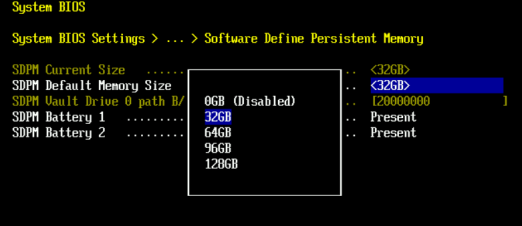
- SDPMのサニタイズと 再起動を確認します。
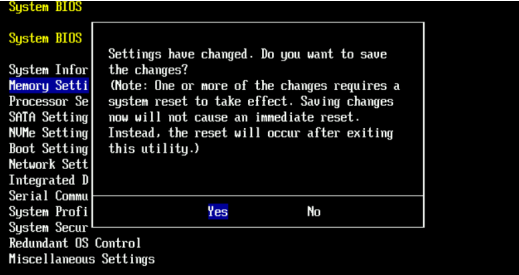
- システムをDDOSで再起動できるようにします
- NVRAM障害アラートをチェックし、ファイル システムが有効になっていることを確認して、SDPMを確認します。
-
# alerts show current
-- There should be no outstanding alert relating to the NVRAM subsystem.
Caution: It may take one to two minutes for the system to clear the NVRAM failure alert.

# system show nvram
Note: The battery must be at least 80% charged for the file system to start.

# filesys status
-- The Filesystem should be Enabled & Running
-
検証チェックリスト:
次のすべてを確認します。
-
- SDPMサニタイズが正常に完了しました。
- NVRAM関連のアクティブなアラートはありません。
- NVRAMステータスは正常に報告される。
- NVRAMバッテリーの充電量が80%以上あること。
- ファイル システムは有効になっていません。
- DDシステムは を実行中です。
いずれかの検証ステップが失敗した場合は、サポート バンドルを収集し、 Dell Data Protectionサポートにお問い合わせください。
Additional Information
これらのアクションはiDRACで設定できます。
Configuration > BIOS Settings > Memory Settings > Persistent Memory- 設定
Sanitize All NVDIMMs宛先ENABLED>- [SDPM Default Memory Size]が <
32GB> 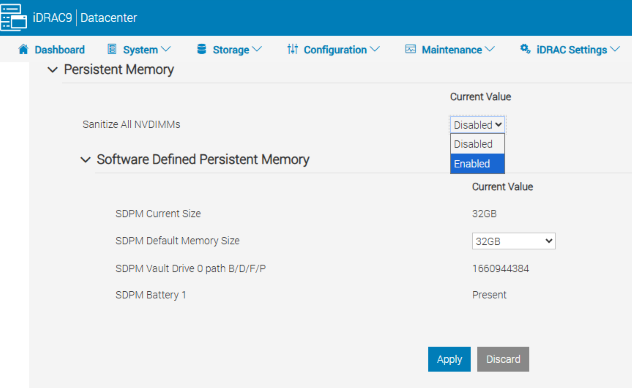
- [SDPM Default Memory Size]が <
- [APPLY]を選択します。次に[OK]をクリックします。
- [At Next Reboot](ページの下部)を選択します。
- 設定
- DDユニットの再起動に進みます(例:DD-CLI:
#system reboot)
リファレンス:
Data Domain:SDPMを診断して解決する方法 |NVRAMアラート
Data Domain:NVRAMハードウェア障害アラート |.EVT-NVRAM-00201
iDRAC(v7.x)のエラーおよびイベント メッセージ リファレンス ガイド
Affected Products
Data Domain, DD6410 Appliance, DD9410 Appliance, DD9910 Appliance, DD9910F ApplianceProducts
Data Domain Deduplication Storage SystemsArticle Properties
Article Number: 000283787
Article Type: How To
Last Modified: 27 Jul 2026
Version: 2
Find answers to your questions from other Dell users
Support Services
Check if your device is covered by Support Services.