Data Domain: Jak ponownie zainicjować i wyczyścić SDPM | NVRAM
Summary: W tym artykule opisano sposób oczyszczania i ponownej konfiguracji ustawień pamięci trwałej zdefiniowanej programowo (SDPM) w systemie BIOS oraz weryfikowania pomyślnej inicjalizacji po powrocie systemu do DDOS. ...
This article applies to
This article does not apply to
This article is not tied to any specific product.
Not all product versions are identified in this article.
Instructions
Dotyczy:
- DD9910, DD9410, DD6410, DD9910F systemy po wymianie modułu NVRAM (VOSS).
- Systemy PowerProtect Data Domain korzystające z SDPM w module VOSS.
- Zdarzenie iDRAC:
SDPM7108 - Critical Diagnostic Event (Sanitize Required) - Wersje All Supported Software (DDOS)
Wymagane działania:
Zainicjuj ponownie SDPM:
- Uruchom system ponownie.
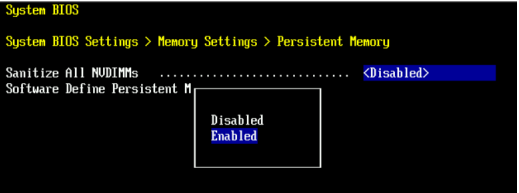
- Otwieranie systemu BIOS <F2>: ustawienia > pamięci systemu BIOS > Pamięć trwała
- Ustaw opcję Sanitize All NVDIMMs na
Enabled
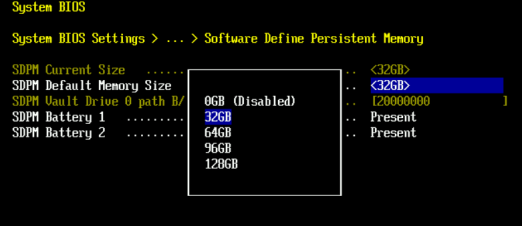
- Ustaw wartość Rozmiar pamięci SDPM na
32 GB
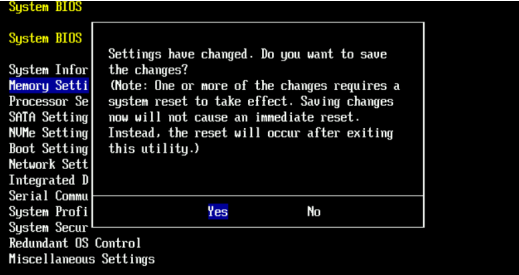
- Potwierdź oczyszczanie SDPM i uruchom ponownie komputer.
- Zezwalaj na ponowne uruchomienie systemu do DDOS
- Sprawdź SDPM, sprawdzając alerty o awarii NVRAM i upewniając się, że system plików jest włączony.
-
# alerts show current
-- There should be no outstanding alert relating to the NVRAM subsystem.
Caution: It may take one to two minutes for the system to clear the NVRAM failure alert.

# system show nvram
Note: The battery must be at least 80% charged for the file system to start.

# filesys status
-- The Filesystem should be Enabled & Running
-
Lista kontrolna weryfikacji:
Potwierdź wszystkie następujące warunki:
-
- Sanityzacja SDPM zakończona pomyślnie.
- Brak aktywnych alertów związanych z pamięcią NVRAM.
- Raporty o stanie pamięci NVRAM są zgłaszane normalnie.
- Poziom naładowania baterii NVRAM wynosi co najmniej 80%.
- W systemie plików wyświetlany jest komunikat „Enabled”.
- System plików jest uruchomiony.
Jeśli którykolwiek z etapów weryfikacji zakończy się niepowodzeniem, zbierz pakiet pomocy technicznej i skontaktuj się z działem pomocy technicznej Dell Data Protection.
Additional Information
Czynności te można również wykonać w kontrolerze iDRAC:
Configuration > BIOS Settings > Memory Settings > Persistent Memory- Ustawienia
Sanitize All NVDIMMsDoENABLED>- Upewnij się, że opcja "SDPM Default Memory Size" jest ustawiona na <
32GB> 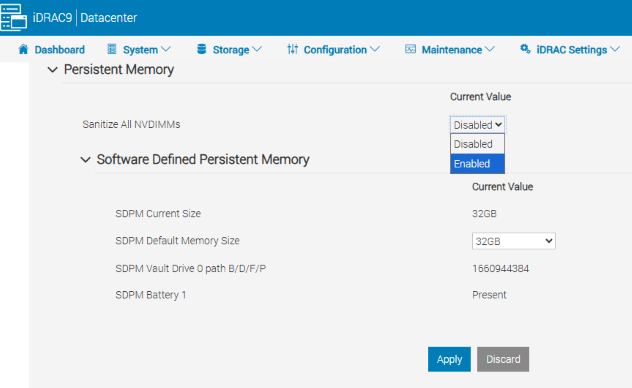
- Upewnij się, że opcja "SDPM Default Memory Size" jest ustawiona na <
- Wybierz opcję APPLY. Następnie kliknij przycisk „OK”.
- Wybierz opcję "Przy następnym uruchomieniu" (dolna część strony)
- Ustawienia
- Przejdź do ponownego uruchomienia jednostki DD (np. za pomocą DD-CLI:
#system reboot).
Referencje:
Data Domain: Diagnozowanie i rozwiązywanie problemów z SDPM | Alerty
NVRAMData Domain: Alert o awarii sprzętowej NVRAM | EVT-NVRAM-00201
—podręcznik referencyjny dotyczący komunikatów o błędach i zdarzeniach kontrolera iDRAC (v7.x)
Affected Products
Data Domain, DD6410 Appliance, DD9410 Appliance, DD9910 Appliance, DD9910F ApplianceProducts
Data Domain Deduplication Storage SystemsArticle Properties
Article Number: 000283787
Article Type: How To
Last Modified: 27 Jul 2026
Version: 2
Find answers to your questions from other Dell users
Support Services
Check if your device is covered by Support Services.