Data Domain: como reinicializar e sanitizar o SDPM | NVRAM
Summary: Este artigo descreve como limpar e redefinir as configurações da memória persistente definida por software (SDPM) no BIOS e verificar a inicialização bem-sucedida depois que o sistema retornar ao DDOS. ...
This article applies to
This article does not apply to
This article is not tied to any specific product.
Not all product versions are identified in this article.
Instructions
Aplica-se a:
- DD9910, DD9410, DD6410, DD9910F sistemas após a substituição do módulo NVRAM (VOSS).
- Sistemas PowerProtect Data Domain que usam SDPM em um módulo VOSS.
- Evento do iDRAC:
SDPM7108 - Critical Diagnostic Event (Sanitize Required) - Todas as versões de software compatíveis (DDOS)
Ações necessárias:
Reinicialize o SDPM:
- Reinicialize o sistema
- Acesse o BIOS <do sistema F2>: BIOS do sistema > Configurações > de memória Memória persistente
- Defina Sanitize All NVDIMMs como
Enabled

- Defina o tamanho da memória SDPM como
32 GB

- Confirme a sanitização e reinicialização do SDPM.
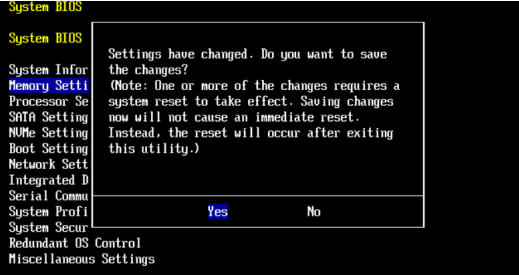
- Permitir que o sistema seja reinicializado no DDOS
- Verifique o SDPM verificando se há alertas de falha de NVRAM e garantindo que o file system esteja ativado.
-
# alerts show current
-- There should be no outstanding alert relating to the NVRAM subsystem.
Caution: It may take one to two minutes for the system to clear the NVRAM failure alert.

# system show nvram
Note: The battery must be at least 80% charged for the file system to start.

# filesys status
-- The Filesystem should be Enabled & Running
-
Lista de verificação de validação:
Confirme todas as opções a seguir:
-
- A sanitização do SDPM foi concluída com sucesso.
- Nenhum alerta ativo relacionado à NVRAM está presente.
- Relatórios de status da NVRAM normalmente.
- A carga da bateria NVRAM é de pelo menos 80%.
- O file system não está ativado.
- O sistema DD está executando o .
Se alguma etapa de validação falhar, colete um pacote de suporte e entre em contato com o Suporte do Dell Data Protection.
Additional Information
Essas ações também podem ser concluídas no iDRAC:
Configuration > BIOS Settings > Memory Settings > Persistent Memory- Settings (Configurações):
Sanitize All NVDIMMsToENABLED>- Certifique-se de que "SDPM Default Memory Size" esteja definido como <
32GB> 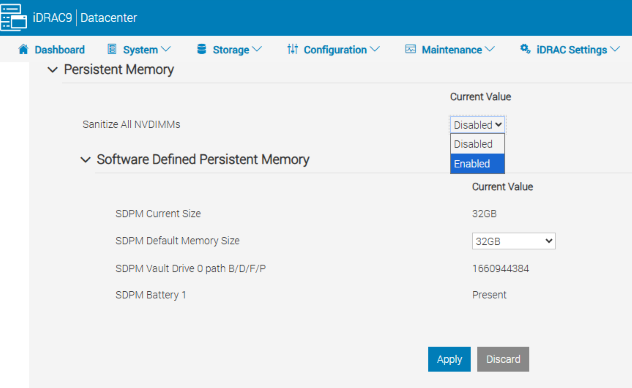
- Certifique-se de que "SDPM Default Memory Size" esteja definido como <
- Selecione APPLY. Depois, clique em "OK".
- Selecione "Na próxima reinicialização" (parte inferior da página)
- Settings (Configurações):
- Prossiga para reinicializar a unidade DD (por exemplo, usando DD-CLI:
#system reboot)
Referências:
Data Domain: como diagnosticar e resolver o SDPM | Alertas
de NVRAMData Domain: alerta de falha de hardware NVRAM | Guia de referência de mensagens de erro e eventos EVT-NVRAM-00201
do iDRAC (v7.x)
Affected Products
Data Domain, DD6410 Appliance, DD9410 Appliance, DD9910 Appliance, DD9910F ApplianceProducts
Data Domain Deduplication Storage SystemsArticle Properties
Article Number: 000283787
Article Type: How To
Last Modified: 27 Jul 2026
Version: 2
Find answers to your questions from other Dell users
Support Services
Check if your device is covered by Support Services.