Data Domain: Så här initierar och sanerar du SDPM | NVRAM
Summary: I den här artikeln beskrivs hur du sanerar och konfigurerar om SDPM-inställningar (Software Defined Persistent Memory) i BIOS och verifierar lyckad initiering när systemet har återgått till DDOS. ...
This article applies to
This article does not apply to
This article is not tied to any specific product.
Not all product versions are identified in this article.
Instructions
Gäller:
- DD9910-, DD9410-, DD6410-DD9910F system efter byte av NVRAM-modul (VOSS).
- PowerProtect Data Domain-system som använder SDPM på en VOSS-modul.
- iDRAC-evenemang:
SDPM7108 - Critical Diagnostic Event (Sanitize Required) - Alla versioner av programvara som stöds (DDOS)
Obligatoriska åtgärder:
Initiera om SDPM:
- Starta om systemet.
- Öppna system-BIOS <F2>: System-BIOS > Minnesinställningar > Beständigt minne
- Ställ in Sanitize All NVDIMM på
Enabled
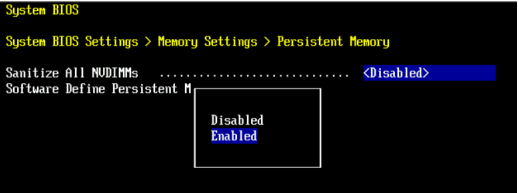
- Ställ in SDPM-minnesstorlek på
32 GB
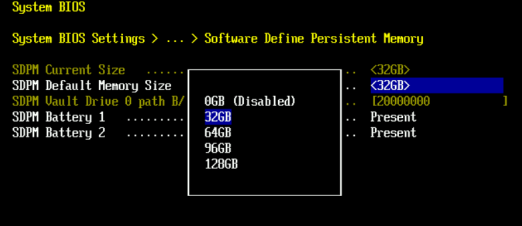
- Bekräfta SDPM-saneringen och starta om.
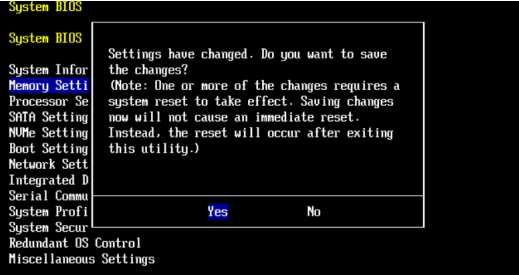
- Tillåt systemet att starta om till DDOS
- Verifiera SDPM genom att söka efter NVRAM-felvarningar och se till att filsystemet är aktiverat.
-
# alerts show current
-- There should be no outstanding alert relating to the NVRAM subsystem.
Caution: It may take one to two minutes for the system to clear the NVRAM failure alert.

# system show nvram
Note: The battery must be at least 80% charged for the file system to start.

# filesys status
-- The Filesystem should be Enabled & Running
-
Checklista för validering:
Bekräfta allt av följande:
-
- SDPM-saneringen har slutförts.
- Det finns inga aktiva NVRAM-relaterade varningar.
- NVRAM-status rapporterar normalt.
- NVRAM-batteriets laddning är minst 80 %.
- Filsystemet visar ”Enabled”.
- Filsystemet körs.
Om något valideringssteg misslyckas kan du hämta ett supportpaket och kontakta Dell Data Protection Support.
Additional Information
Dessa åtgärder kan även slutföras i iDRAC:
Configuration > BIOS Settings > Memory Settings > Persistent Memory- Inställningar
Sanitize All NVDIMMs" till <ENABLED>- Kontrollera att "SDPM Default Memory Size" är inställt på <
32GB> 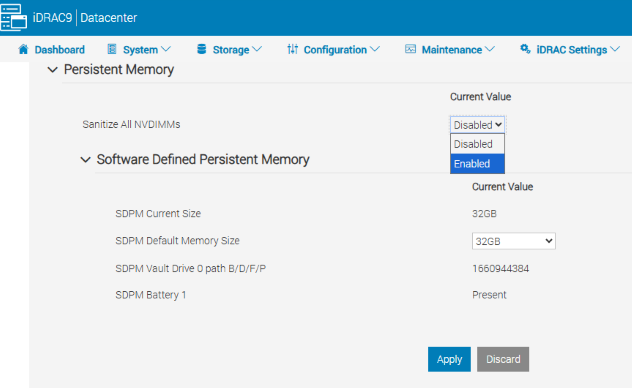
- Kontrollera att "SDPM Default Memory Size" är inställt på <
- Välj Apply (Tillämpa) Tryck sedan på OK.
- Välj "Vid nästa omstart" (längst ner på sidan)
- Inställningar
- Fortsätt med att starta om DD-enheten (t.ex. med hjälp av DD-CLI:
#system reboot)
Referenser:
Data Domain: Så här diagnostiserar och löser du SDPM | NVRAM Alerts
Data Domain: Varning om maskinvarufel i NVRAM | EVT-NVRAM-00201
Referensmanual för iDRAC (v7.x) fel- och händelsemeddelanden
Affected Products
Data Domain, DD6410 Appliance, DD9410 Appliance, DD9910 Appliance, DD9910F ApplianceProducts
Data Domain Deduplication Storage SystemsArticle Properties
Article Number: 000283787
Article Type: How To
Last Modified: 27 Jul 2026
Version: 2
Find answers to your questions from other Dell users
Support Services
Check if your device is covered by Support Services.