Data Domain: SDPM'yi Yeniden Başlatma ve Temizleme | NVRAM
Summary: Bu makalede, BIOS'taki Yazılım Tanımlı Kalıcı Bellek (SDPM) ayarlarının nasıl temizleneceği ve yeniden yapılandırılacağı ve sistem DDOS a döndükten sonra başlatmanın başarılı bir şekilde nasıl doğrulanacağı açıklanmaktadır. ...
This article applies to
This article does not apply to
This article is not tied to any specific product.
Not all product versions are identified in this article.
Instructions
Aşağıdakiler için geçerlidir:
- NVRAM (VOSS) modülü değişimi sonrası DD9910, DD9410, DD6410 DD9910F sistemleri.
- VOSS modülünde SDPM kullanan PowerProtect Data Domain sistemleri.
- iDRAC Olayı:
SDPM7108 - Critical Diagnostic Event (Sanitize Required) - Desteklenen tüm yazılım (DDOS) sürümleri
Gerekli Eylemler:
SDPM'yi yeniden başlatın:
- Sistemi yeniden başlatın
- Sistem BIOS <una erişin F2>: Sistem BIOS > u Bellek Ayarları > Kalıcı Bellek
- Tüm NVDIMM'leri Temizle'yi
Enabled
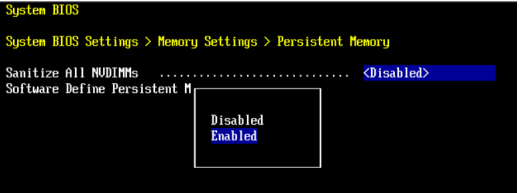
- SDPM Bellek Boyutunu
32 GB
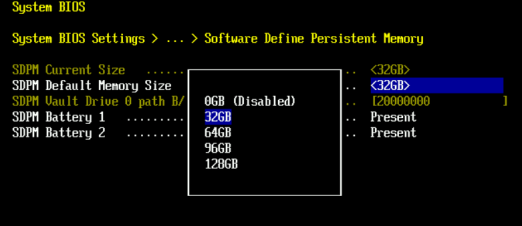
- SDPM temizleme işlemini onaylayın ve yeniden başlatın.
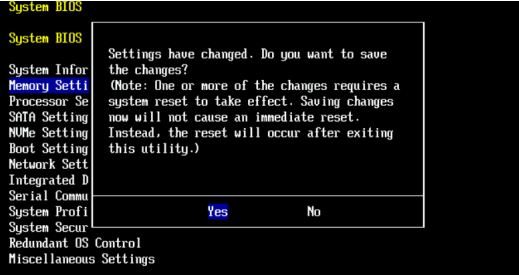
- Sistemin DDOS a yeniden başlatılmasına izin verin
- NVRAM arıza uyarılarını kontrol ederek ve dosya sisteminin etkin olduğundan emin olarak SDPM'yi doğrulayın.
-
# alerts show current
-- There should be no outstanding alert relating to the NVRAM subsystem.
Caution: It may take one to two minutes for the system to clear the NVRAM failure alert.

# system show nvram
Note: The battery must be at least 80% charged for the file system to start.

# filesys status
-- The Filesystem should be Enabled & Running
-
Doğrulama Kontrol Listesi:
Aşağıdakilerin tümünü onaylayın:
-
- SDPM temizleme işlemi başarıyla tamamlandı.
- NVRAM ile ilgili aktif uyarı yok.
- NVRAM durumu normal şekilde bildiriyor.
- NVRAM pil şarjı en az %80'dir.
- Dosya sistemi etkindir.
- DD sistemi çalıştırmaktadır.
Herhangi bir doğrulama adımı başarısız olursa bir destek paketi alın ve Dell Data Protection Destek ekibiyle iletişime geçin.
Additional Information
Bu eylemler iDRAC'ta da tamamlanabilir:
Configuration > BIOS Settings > Memory Settings > Persistent Memory- Ayar
Sanitize All NVDIMMsHedefENABLED>- SDPM Varsayılan Bellek Boyutu" ayarının <
32GB> 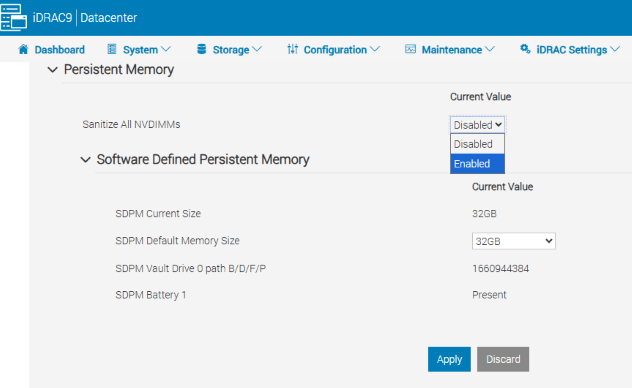
- SDPM Varsayılan Bellek Boyutu" ayarının <
- Uygula öğesini seçin. Ardından "OK" öğesine tıklayın.
- 'Bir Sonraki Yeniden Başlatmada'yı seçin (Sayfanın alt kısmı)
- Ayar
- DD ünitesini yeniden başlatmaya devam edin (ör. DD-CLI kullanarak:
#system reboot)
Referanslar:
Data Domain: SDPM Nasıl Tanılanır ve Çözülür | NVRAM Uyarıları
Data Domain: NVRAM Donanım Arızası Uyarısı | EVT-NVRAM-00201
iDRAC (v7.x) Hata ve Olay İletileri Referans Rehberi
Affected Products
Data Domain, DD6410 Appliance, DD9410 Appliance, DD9910 Appliance, DD9910F ApplianceProducts
Data Domain Deduplication Storage SystemsArticle Properties
Article Number: 000283787
Article Type: How To
Last Modified: 27 Jul 2026
Version: 2
Find answers to your questions from other Dell users
Support Services
Check if your device is covered by Support Services.