Data Domain:如何重新初始化和清理 SDPM |NVRAM
Summary: 本文說明如何清除和重新設定 BIOS 中的軟體定義持續性記憶體 (SDPM) 設定,並在系統返回 DDOS 後確認初始化成功。
This article applies to
This article does not apply to
This article is not tied to any specific product.
Not all product versions are identified in this article.
Instructions
適用於:
- DD9910、DD9410、DD6410 在更換 NVRAM (VOSS) 模組後DD9910F系統。
- 在 VOSS 模組上使用 SDPM 的 PowerProtect Data Domain 系統。
- iDRAC 事件
SDPM7108 - Critical Diagnostic Event (Sanitize Required) - 所有支援的軟體 (DDOS) 版本
必要動作:
重新初始化 SDPM:
- 將系統重新開機。
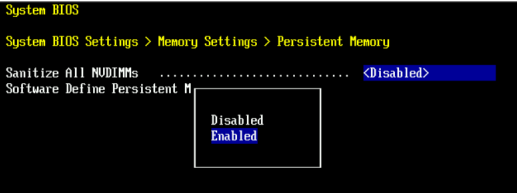
- 存取系統 BIOS <F2>: 系統 BIOS > 記憶體設定 > 持續性記憶體
- 將 清理所有 NVDIMM 設為
Enabled
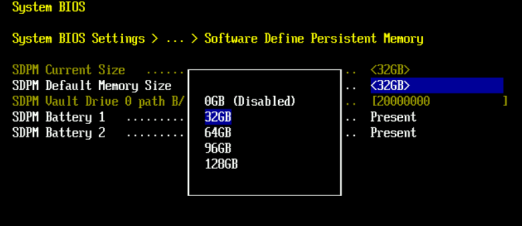
- 將 SDPM 記憶體大小設為
32 GB
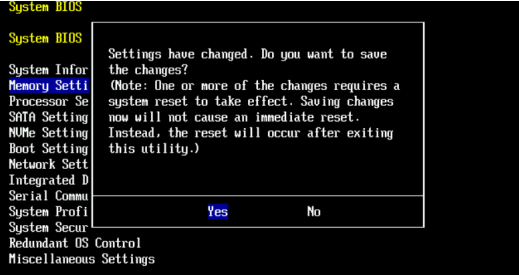
- 確認 SDPM 清理並 重新開機。
- 允許系統重新開機至 DDOS
- 檢查是否有 NVRAM 故障警示,並確定已啟用檔案系統,以驗證 SDPM。
-
# alerts show current
-- There should be no outstanding alert relating to the NVRAM subsystem.
Caution: It may take one to two minutes for the system to clear the NVRAM failure alert.

# system show nvram
Note: The battery must be at least 80% charged for the file system to start.

# filesys status
-- The Filesystem should be Enabled & Running
-
驗證檢查清單:
請確認下列所有事項:
-
- SDPM 清理已成功完成。
- 沒有作用中 NVRAM 相關的警示。
- NVRAM 狀態報告正常。
- NVRAM 電池電量至少為 80%。
- 檔案系統顯示「Enabled」
- 檔案系統正在執行中。
如果任何驗證步驟失敗,請收集支援套裝並聯絡 Dell Data Protection 支援。
Additional Information
這些動作也可以在 iDRAC 中完成:
Configuration > BIOS Settings > Memory Settings > Persistent Memory- SET
Sanitize All NVDIMMs變更為ENABLED>- 請確定「SDPM 預設記憶體大小」已設為 <
32GB> 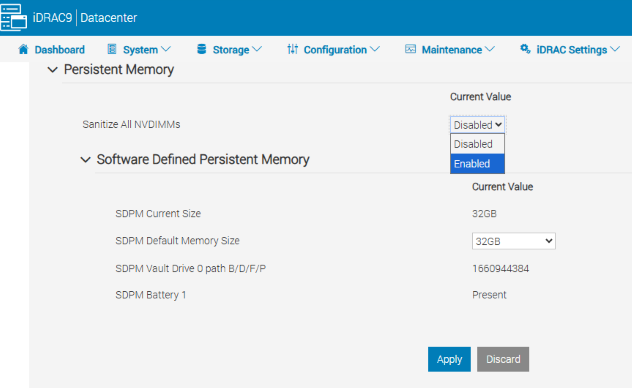
- 請確定「SDPM 預設記憶體大小」已設為 <
- 選取套用。然後按一下「OK」
- 選取「下次重新開機時」(頁面底部)
- SET
- 繼續將 DD 裝置重新開機 (例如,使用 DD-CLI:
#system reboot)
參考資料:
Data Domain:如何診斷和解決 SDPM |NVRAM 警示
Data Domain:NVRAM 硬體故障警示 |EVT-NVRAM-00201
iDRAC (v7.x) 錯誤和事件訊息參考指南
Affected Products
Data Domain, DD6410 Appliance, DD9410 Appliance, DD9910 Appliance, DD9910F ApplianceProducts
Data Domain Deduplication Storage SystemsArticle Properties
Article Number: 000283787
Article Type: How To
Last Modified: 27 Jul 2026
Version: 2
Find answers to your questions from other Dell users
Support Services
Check if your device is covered by Support Services.