Sådan installerer du Dell Client Device Manager
Summary: Denne artikel indeholder oplysninger om installation af Dell Client Device Manager (DCDM).
This article applies to
This article does not apply to
This article is not tied to any specific product.
Not all product versions are identified in this article.
Instructions
Berørte produkter:
- Dell Client Device Manager
- Download og udpak:
- Kør kommandoprompten som administrator.
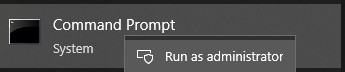
- Skift mappen (cd) til den placering, hvor DCDM blev pakket ud.

- Kør PowerShell script ved hjælp af parametrene eller eksemplerne nedenfor baseret på dine behov
powershell.exe -executionpolicy Bypass -windowstyle hidden -noninteractive -nologo -file "dcdm_deployment.ps1" -action -modules

| Parameter | Beskrivelse |
|---|---|
| -Hjælp | Valgfrit Viser en beskrivelse af parametrene |
| -handling | Obligatorisk Angiver den handling, der skal udføres (installation eller afinstallation) |
| -Moduler | Valgfrit Angiver de moduler, der skal medtages. Standard (DCDMCS, DCDMU, DCDMS) |
| -logsti | Standardindstillingen er C:ProgramData\Dell\ClientDeviceManager. Angiver stien til logfiler |
| -Verboselog | Valgfrit Aktiverer logvisning i konsollen (sand eller falsk) |
| -debuglevel | Valgfri standard er alt. Angiver niveauet for fejlfindingsoplysninger |
| -telemetrisamtykke | Valgfri Standard er sand. Angiver samtykke til telemetri |
| Modul | Beskrivelse | Modulet afhænger af |
|---|---|---|
| DCDMCS | Dell Client Device Manager Core Services (tidligere kendt som Dell Core Service (DCS)) | I/R kernekomponent kræves |
| DCDMS | Dell Client Device Manager Security (tidligere kendt som Dell Trusted Device (DTD)) | DCDMCS |
| DCDMU | Dell Client Device Manager Update (tidligere kendt som Dell Command Update (DCU)) | DCDMCS, DCDMS |
Eksempler:
Installer eller opdater alle moduler, og send telemetri til DCDMU
powershell.exe -executionpolicy Bypass -windowstyle hidden -noninteractive -nologo -file "dcdm_deployment.ps1" -action "install"
Installer eller opdater alle moduler uden telemetri
powershell.exe -executionpolicy Bypass -windowstyle hidden -noninteractive -nologo -file "dcdm_deployment.ps1" -action "install" -telemetryconsent "false"
Installer eller opdater Dell Client Device Manager | Sikkerhed (DCDMS)
powershell.exe -executionpolicy Bypass -windowstyle hidden -noninteractive -nologo -file "dcdm_deployment.ps1" -action "install" -modules "DCDMS"
Afinstallation af Dell Client Device Manager | Sikkerhed (DCDMS)
powershell.exe -executionpolicy Bypass -windowstyle hidden -noninteractive -nologo -file "dcdm_deployment.ps1" -action "uninstall" -modules "DCDMS"
Afinstaller alle moduler
powershell.exe -executionpolicy Bypass -windowstyle hidden -noninteractive -nologo -file "dcdm_deployment.ps1" -action "uninstall"
Affected Products
Dell Client Device ManagerArticle Properties
Article Number: 000299185
Article Type: How To
Last Modified: 22 May 2026
Version: 3
Find answers to your questions from other Dell users
Support Services
Check if your device is covered by Support Services.