Dell Client Device Manager installeren
Summary: Dit artikel bevat informatie over het installeren van Dell Client Device Manager (DCDM).
This article applies to
This article does not apply to
This article is not tied to any specific product.
Not all product versions are identified in this article.
Instructions
Betreffende producten:
- Dell Client Device Manager
- Downloaden en uitpakken:
- Raadpleeg Dell Client Device Manager downloaden
- Raadpleeg Dell Client Device Manager uitpakken.
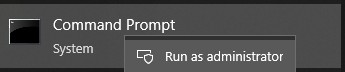
- Voer de opdrachtprompt uit als administrator.
- Wijzig de directory (cd) in de locatie waar DCDM is uitgepakt.

- Voer de PowerShell script uit met behulp van de parameters of voorbeelden hieronder op basis van uw behoeften
powershell.exe -executionpolicy Bypass -windowstyle hidden -noninteractive -nologo -file "dcdm_deployment.ps1" -action -modules

| Parameter | Beschrijving |
|---|---|
| -Help | Optioneel Geeft een beschrijving van parameters weer |
| -actie | Verplicht Specificeert de actie die moet worden uitgevoerd (installeren of verwijderen) |
| -Modules | Optioneel Specificeert de modules die moeten worden opgenomen. Standaard (DCDMCS,DCDMU,DCDMS) |
| -logpath | Optioneel De standaardinstelling is C:ProgramData\Dell\ClientDeviceManager. Geeft het pad voor logbestanden aan |
| -verboselog | Optioneel Schakelt logboekweergave in de console in (waar of onwaar) |
| ·foutopsporing niveau | Optioneel Standaard is alles. Specificeert het niveau van foutopsporingsinformatie |
| -telemetrie toestemming | Optioneel: Standaardwaarde is waar. Geeft toestemming voor telemetrie aan |
| Module | Beschrijving | Module is afhankelijk van |
|---|---|---|
| DCDMCS | Dell Client Device Manager Core Services (voorheen Dell Core Service (DCS)) | N.v.t. kerncomponent vereist |
| DCDMS | Dell Client Device Manager Security (voorheen bekend als Dell Trusted Device (DTD)) | DCDMCS |
| DCDMU | Dell Client Device Manager Update (voorheen Dell Command Update (DCU)) | DCDMCS, DCDMS |
Voorbeelden:
Installeer of update alle modules en verzend telemetrie voor DCDMU
powershell.exe -executionpolicy Bypass -windowstyle hidden -noninteractive -nologo -file "dcdm_deployment.ps1" -action "install"
Alle modules installeren of bijwerken zonder telemetrie
powershell.exe -executionpolicy Bypass -windowstyle hidden -noninteractive -nologo -file "dcdm_deployment.ps1" -action "install" -telemetryconsent "false"
Dell Client Device Manager installeren of bijwerken | Beveiliging (DCDMS)
powershell.exe -executionpolicy Bypass -windowstyle hidden -noninteractive -nologo -file "dcdm_deployment.ps1" -action "install" -modules "DCDMS"
Dell Client Device Manager verwijderen | Beveiliging (DCDMS)
powershell.exe -executionpolicy Bypass -windowstyle hidden -noninteractive -nologo -file "dcdm_deployment.ps1" -action "uninstall" -modules "DCDMS"
Verwijder alle modules
powershell.exe -executionpolicy Bypass -windowstyle hidden -noninteractive -nologo -file "dcdm_deployment.ps1" -action "uninstall"
Affected Products
Dell Client Device ManagerArticle Properties
Article Number: 000299185
Article Type: How To
Last Modified: 22 May 2026
Version: 3
Find answers to your questions from other Dell users
Support Services
Check if your device is covered by Support Services.