Slik installerer du Dell Client Device Manager
Summary: Denne artikkelen inneholder informasjon om hvordan du installerer Dell Client Device Manager (DCDM).
This article applies to
This article does not apply to
This article is not tied to any specific product.
Not all product versions are identified in this article.
Instructions
Berørte produkter:
- Dell Client Device Manager
- Last ned og pakk ut:
- Referanse, Slik laster du ned Dell Client Device Manager
- Referanse, hvordan du pakker ut Dell Client Device Manager.
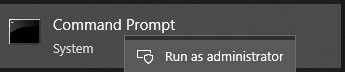
- Kjør ledeteksten som administrator.
- Endre katalogen (cd) til plasseringen der DCDM ble pakket ut.

- Kjør PowerShell-skreppet ved hjelp av parameterne eller eksemplene nedenfor, basert på dine behov
powershell.exe -executionpolicy Bypass -windowstyle hidden -noninteractive -nologo -file "dcdm_deployment.ps1" -action -modules

| Parameter | Beskrivelse |
|---|---|
| -hjelp | Valgfritt: Viser en beskrivelse av parametere |
| -handling | Obligatorisk Angir handlingen som skal utføres (installasjon eller avinstallering) |
| -Moduler | Valgfritt Angir modulene som skal inkluderes. Standard (DCDMCS, DCDMU, DCDMS) |
| -Logpath | Valgfritt: Standard er C:ProgramData\Dell\ClientDeviceManager. Angir banen for loggfiler |
| -verboselog | Valgfritt: Aktiverer loggvisning i konsollen (sann eller usann) |
| -debuglevel | Valgfri standard er alt. Angir nivået for feilsøkingsinformasjon |
| -telemetri | Valgfri standard er sann. Angir samtykke til telemetri |
| Modul | Beskrivelse | Modulen avhenger av |
|---|---|---|
| DCDMCS | Kjernetjenester for Dell enhetsbehandling for klient (tidligere kjent som Dell Core Service (DCS)) | N/A-kjernekomponent kreves |
| DCDMS | Dell Client Device Manager Security (tidligere kjent som Dell Trusted Device (DTD)) | DCDMCS |
| DCDMU | Dell Client Device Manager Update (tidligere kjent som Dell Command Update (DCU)) | DCDMCS, DCDMS |
Eksempler:
Installere eller oppdatere alle moduler og sende telemetri for DCDMU
powershell.exe -executionpolicy Bypass -windowstyle hidden -noninteractive -nologo -file "dcdm_deployment.ps1" -action "install"
Installer eller oppdater alle moduler uten telemetri
powershell.exe -executionpolicy Bypass -windowstyle hidden -noninteractive -nologo -file "dcdm_deployment.ps1" -action "install" -telemetryconsent "false"
Installere eller oppdatere Dell Client Device Manager | Sikkerhet (DCDMS)
powershell.exe -executionpolicy Bypass -windowstyle hidden -noninteractive -nologo -file "dcdm_deployment.ps1" -action "install" -modules "DCDMS"
Avinstallere Dell Client Device Manager | Sikkerhet (DCDMS)
powershell.exe -executionpolicy Bypass -windowstyle hidden -noninteractive -nologo -file "dcdm_deployment.ps1" -action "uninstall" -modules "DCDMS"
Avinstaller alle moduler
powershell.exe -executionpolicy Bypass -windowstyle hidden -noninteractive -nologo -file "dcdm_deployment.ps1" -action "uninstall"
Affected Products
Dell Client Device ManagerArticle Properties
Article Number: 000299185
Article Type: How To
Last Modified: 22 May 2026
Version: 3
Find answers to your questions from other Dell users
Support Services
Check if your device is covered by Support Services.