如何安裝 Dell 用戶端裝置管理員
Summary: 本文提供安裝 Dell 用戶端裝置管理員 (DCDM) 的相關資訊。
This article applies to
This article does not apply to
This article is not tied to any specific product.
Not all product versions are identified in this article.
Instructions
受影響的產品:
- Dell 用戶端裝置管理員
- 下載 和解 壓縮:
- 請參閱如何 下載 Dell Client Device Manager
- 請參閱 如何解壓縮 Dell 用戶端裝置管理員。
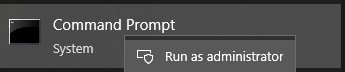
- 以系統管理員身分執行命令提示字元。
- 將目錄 (cd) 變更為 DCDM 解壓縮的位置。

- 根據您的需求,使用以下參數或範例執行 PowerShell script
powershell.exe -executionpolicy Bypass -windowstyle hidden -noninteractive -nologo -file "dcdm_deployment.ps1" -action -modules

| 參數 | 說明 |
|---|---|
| -help | 選用:顯示參數說明 |
| -動作 | 強制:指定要執行的動作 (安裝或解除安裝) |
| -模組 | 選用:指定要包含的模組。預設值 (DCDMCS、DCDMU、DCDMS) |
| -logpath | 選用:預設值為 C:ProgramData\Dell\ClientDeviceManager。指定記錄檔的路徑 |
| -詳細日誌 | 選用:啟用主控台記錄顯示 (True or False) |
| -調試等級 | 選用預設值為全部。指定除錯資訊的層級 |
| -遙測同意 | 可選預設值為 true。表示遙測同意 |
| 模組 | 說明 | 模組取決於 |
|---|---|---|
| DCDMCS | Dell Client Device Manager Core Services (先前稱為 Dell Core Service (DCS)) | 需要 N/A 核心元件 |
| DCDMS | Dell 用戶端裝置管理員安全性 (先前稱為 Dell 受信任裝置 (DTD)) | DCDMCS |
| 德德穆 | Dell 用戶端裝置管理員更新 (先前稱為 Dell Command Update (DCU)) | DCDMCS、DCDMS |
範例:
安裝或更新所有模組,並傳送 DCDMU 遙測資料
powershell.exe -executionpolicy Bypass -windowstyle hidden -noninteractive -nologo -file "dcdm_deployment.ps1" -action "install"
在不進行遙測的情況下安裝或更新所有模組
powershell.exe -executionpolicy Bypass -windowstyle hidden -noninteractive -nologo -file "dcdm_deployment.ps1" -action "install" -telemetryconsent "false"
安裝或更新 Dell 用戶端裝置管理員 |安全性 (DCDMS)
powershell.exe -executionpolicy Bypass -windowstyle hidden -noninteractive -nologo -file "dcdm_deployment.ps1" -action "install" -modules "DCDMS"
解除安裝 Dell 用戶端裝置管理員 |安全性 (DCDMS)
powershell.exe -executionpolicy Bypass -windowstyle hidden -noninteractive -nologo -file "dcdm_deployment.ps1" -action "uninstall" -modules "DCDMS"
解除安裝所有模組
powershell.exe -executionpolicy Bypass -windowstyle hidden -noninteractive -nologo -file "dcdm_deployment.ps1" -action "uninstall"
Affected Products
Dell Client Device ManagerArticle Properties
Article Number: 000299185
Article Type: How To
Last Modified: 22 May 2026
Version: 3
Find answers to your questions from other Dell users
Support Services
Check if your device is covered by Support Services.