Как установить Dell Client Device Manager
Summary: В этой статье представлена информация об установке Dell Client Device Manager (DCDM).
This article applies to
This article does not apply to
This article is not tied to any specific product.
Not all product versions are identified in this article.
Instructions
Затронутые продукты:
- Диспетчер клиентских устройств Dell
- Загрузка и извлечение:
- Запустите командную строку от имени администратора.
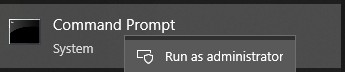
- Перейдите в каталог (cd), в который был извлечен DCDM.

- Запустите сценарий PowerShell, используя параметры или приведенные ниже примеры, в зависимости от ваших потребностей
powershell.exe -executionpolicy Bypass -windowstyle hidden -noninteractive -nologo -file "dcdm_deployment.ps1" -action -modules

| Параметр | Описание |
|---|---|
| -help | Необязательно: отображение описания параметров |
| -действие | Обязательное Указывается действие, которое необходимо выполнить (установить или удалить). |
| -Модули | Необязательный Указывает модули, которые должны быть включены. По умолчанию (DCDMCS, DCDMU, DCDMS) |
| -logpath | Необязательный: значение по умолчанию: C:ProgramData\Dell\ClientDeviceManager. Указывает путь к файлам журнала |
| -verboselog | Опционально: включает отображение журнала в консоли (True или False) |
| -уровень отладки | Необязательное значение по умолчанию — «all». Определяет уровень отладочной информации |
| -телеметриясогласие | Необязательный параметр: По умолчанию true. Указывает согласие на использование телеметрии |
| Модуль | Описание | Модуль зависит от |
|---|---|---|
| DCDMCS | Основные услуги Dell Client Device Manager (прежнее название — Dell Core Service (DCS)) | Требуется основной компонент н/д |
| ДСДМС | Dell Client Device Manager Security (ранее Dell Trusted Device (DTD)) | DCDMCS |
| ДКДМУ | Обновление Dell Client Device Manager Update (ранее Dell Command Update (DCU)) | DCDMCS, DCDMS |
Примеры:
Установка или обновление всех модулей и отправка телеметрии для DCDMU
powershell.exe -executionpolicy Bypass -windowstyle hidden -noninteractive -nologo -file "dcdm_deployment.ps1" -action "install"
Установка или обновление всех модулей без телеметрии
powershell.exe -executionpolicy Bypass -windowstyle hidden -noninteractive -nologo -file "dcdm_deployment.ps1" -action "install" -telemetryconsent "false"
Установка или обновление Dell Client Device Manager | Безопасность (DCDMS)
powershell.exe -executionpolicy Bypass -windowstyle hidden -noninteractive -nologo -file "dcdm_deployment.ps1" -action "install" -modules "DCDMS"
Удаление Dell Client Device Manager | Безопасность (DCDMS)
powershell.exe -executionpolicy Bypass -windowstyle hidden -noninteractive -nologo -file "dcdm_deployment.ps1" -action "uninstall" -modules "DCDMS"
Удалите все модули
powershell.exe -executionpolicy Bypass -windowstyle hidden -noninteractive -nologo -file "dcdm_deployment.ps1" -action "uninstall"
Affected Products
Dell Client Device ManagerArticle Properties
Article Number: 000299185
Article Type: How To
Last Modified: 22 May 2026
Version: 3
Find answers to your questions from other Dell users
Support Services
Check if your device is covered by Support Services.