Як встановити диспетчер пристроїв клієнта Dell
Summary: У цій статті наведено інформацію про встановлення диспетчера клієнтських пристроїв Dell (DCDM).
This article applies to
This article does not apply to
This article is not tied to any specific product.
Not all product versions are identified in this article.
Instructions
Продукти, на які вплинули:
- Диспетчер клієнтських пристроїв Dell
- Завантажити та розпакувати:
- Запустіть командний рядок від імені адміністратора.
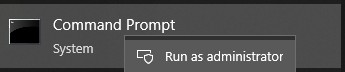
- Змініть каталог (cd) на місце, де було видобуто DCDM.

- Запустіть scrip PowerShell, використовуючи параметри або приклади, наведені нижче, залежно від ваших потреб
powershell.exe -executionpolicy Bypass -windowstyle hidden -noninteractive -nologo -file "dcdm_deployment.ps1" -action -modules

| Параметр | Опис |
|---|---|
| -Допомога | Необов'язковий Відображає опис параметрів |
| -дія | Обов'язково вказує дію, яку потрібно виконати (встановити або видалити) |
| -Модулі | Необов'язковий Вказує модулі, які потрібно включити. За замовчуванням (DCDMCS, DCDMU, DCDMS) |
| -logpath | Необов'язковий За замовчуванням C:ProgramData\Dell\ClientDeviceManager. Вказує шлях до файлів журналу |
| -verboselog | Опціонально Включає відображення журналу в консолі (True або False) |
| -рівень налагодження | Необов'язковий За замовчуванням є все. Визначає рівень налагодження інформації |
| -телеметріязгода | Необов'язковий За замовчуванням має значення true. Вказує на згоду на телеметрію |
| Модуль | Опис | Модуль залежить від |
|---|---|---|
| ДКДМКС | Dell Client Device Manager Core Services (раніше відома як Dell Core Service (DCS)) | Необхідний Н/Д основний компонент |
| DCDMS | Dell Client Device Manager Security (раніше відома як Dell Trusted Device (DTD)) | ДКДМКС |
| ДКДМУ | Dell Client Device Manager Update (раніше відоме як Dell Command Update (DCU)) | DCDMCS, DCDMS |
Приклади:
Встановіть або оновіть всі модулі та надішліть телеметрію для DCDMU
powershell.exe -executionpolicy Bypass -windowstyle hidden -noninteractive -nologo -file "dcdm_deployment.ps1" -action "install"
Встановіть або оновіть усі модулі без телеметрії
powershell.exe -executionpolicy Bypass -windowstyle hidden -noninteractive -nologo -file "dcdm_deployment.ps1" -action "install" -telemetryconsent "false"
Інсталяція або оновлення диспетчера клієнтських пристроїв Dell | Безпека (DCDMS)
powershell.exe -executionpolicy Bypass -windowstyle hidden -noninteractive -nologo -file "dcdm_deployment.ps1" -action "install" -modules "DCDMS"
Видалення диспетчера пристроїв клієнта Dell | Безпека (DCDMS)
powershell.exe -executionpolicy Bypass -windowstyle hidden -noninteractive -nologo -file "dcdm_deployment.ps1" -action "uninstall" -modules "DCDMS"
Видаліть усі модулі
powershell.exe -executionpolicy Bypass -windowstyle hidden -noninteractive -nologo -file "dcdm_deployment.ps1" -action "uninstall"
Affected Products
Dell Client Device ManagerArticle Properties
Article Number: 000299185
Article Type: How To
Last Modified: 22 May 2026
Version: 3
Find answers to your questions from other Dell users
Support Services
Check if your device is covered by Support Services.