The Alienware Area-51 AAT2250 Might Not Power On with Third-party XMP Memory or Cannot Enable the Memory Overclock Function
Summary: This article provides information about Alienware Area-51 AAT2250 systems may not power on or the memory overclock function may be hidden when using third-party XMP memory.
This article applies to
This article does not apply to
This article is not tied to any specific product.
Not all product versions are identified in this article.
Symptoms
Installing non-Dell-certified XMP memory on the Alienware Area-51 AAT2250 may result in the system failing to power on or the inability to enable the memory overclock function in the BIOS.
- System fails to power On
The system's compatibility is determined by the type of XMP memory used. If XMP memory modules requiring higher VDD (Drain Voltage) are installed, the system may not boot successfully. In such instances, it flashes either 2A4W or 2A5W error codes when unable to power on. - Inability to enable the memory overclocks function in the BIOS.
Go to BIOS->Performance → Overclock Feature → Switch to "On." When users set the overclocking feature to "ON," a warning message is displayed. Selecting "Yes" requests the system to operate in performance mode, showing the available overclocking (OC) options. Choosing "No" bypasses the request, leaving the OC features inaccessible.
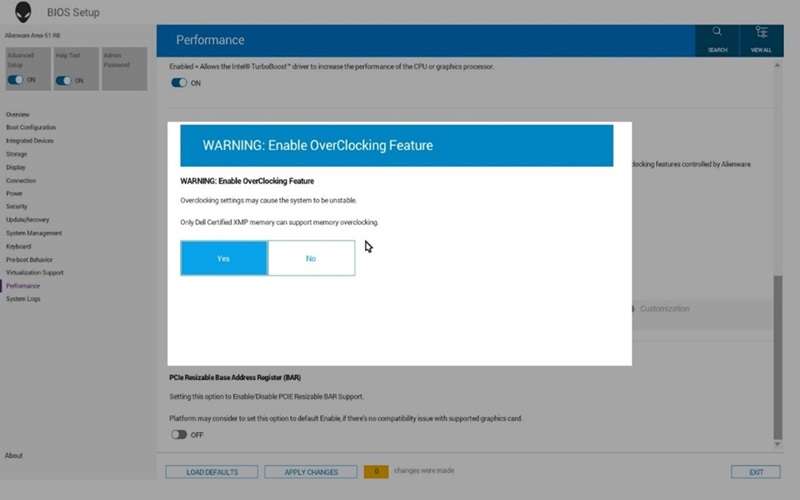
(Figure 1 - Over-Clocking Feature)
The XMP profile enable option does not appear when installing non-Dell-qualified XMP memory.
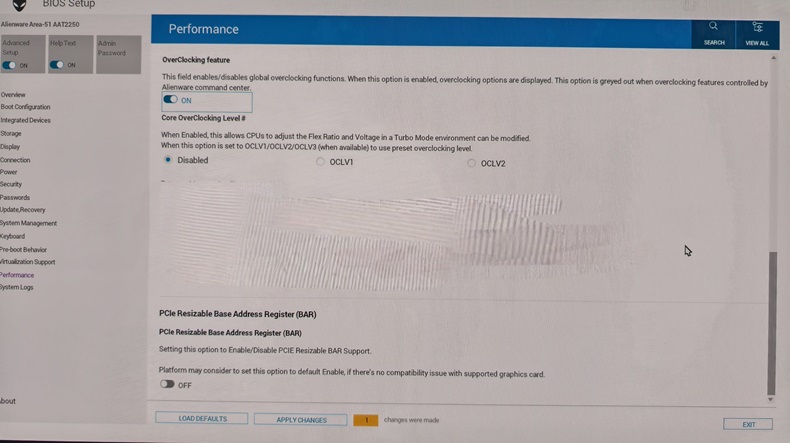
(Figure 2 - Performance)
When installing Dell-qualified XMP memory, there is an Extreme Memory Profile option list under overclocking.
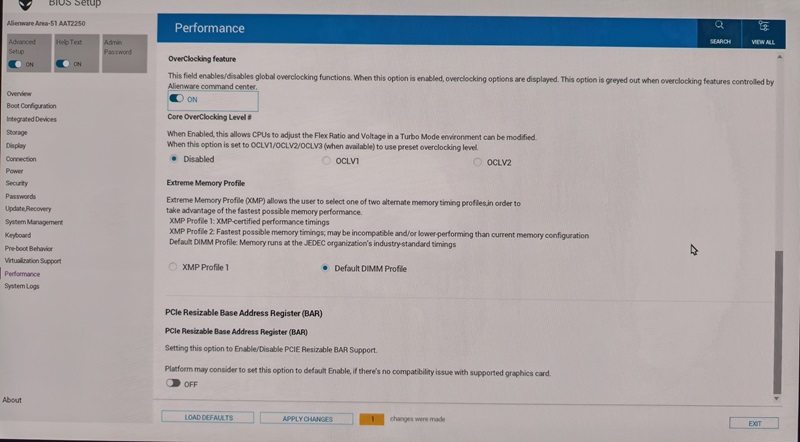
(Figure 3 - Extreme Memory Profile)
Affected Platform:
- Alienware Area-51 AAT2250
Cause
Third-party memory modules compatibility issue
Resolution
The Alienware Area-51 AAT2250 has a specific XMP memory requirement. (Only Dell Certified Kingston XMP memory is supported.)
These details are found online in the Alienware Area-51 AAT2250 Owner's Manual (Memory Specifications page).
Reinstall the Dell factory-shipped memory modules or purchase Dell-qualified XMP memory listed in the table below.
(Table 1 - Dell Qualified XMP Memory)
| 668G8 | DIMM, 16 GB, 6400, DDR5, NU, XMP | Kingston | X66G8-HYA-A |
| DIMM, 16 GB, 6400, DDR5, NU, XMP | Kingston | X66G8-HYA-K | |
| N09RP | DIMM, 32 GB, 6400, DDR5, NU, XMP | Kingston | N09RP-HYA-A |
| DIMM, 32 GB, 6400, DDR5, NU, XMP | Kingston | N09RP-HYA-K |
Affected Products
Alienware Area-51 AAT2250Article Properties
Article Number: 000299961
Article Type: Solution
Last Modified: 22 May 2026
Version: 3
Find answers to your questions from other Dell users
Support Services
Check if your device is covered by Support Services.