0xC00DB3B0 Ogg形式のオーディオファイルの再生時のエラーコード
Summary: Dell製デスクトップ、ノートパソコン、またはタブレットでOgg形式のオーディオ ファイルを再生すると、エラー コード0xC00DB3B0が表示されます。
This article applies to
This article does not apply to
This article is not tied to any specific product.
Not all product versions are identified in this article.
Symptoms
Dell製デスクトップ、ノートパソコン、またはタブレットで、Ogg形式のオーディオ ファイルを再生0xC00DB3B0エラー コードが表示され、次のメッセージが表示されます。
- 「"ファイル名" を開けません。サポートされていないエンコード設定を使用しています。
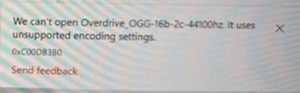
影響を受けるプラットフォーム:
- Dell 14 DC14255
- Dell 16 DC16255
- Dell 16 DC16256
- Dell Pro 13 Premium PA13250
- Dell Pro 14 Essential PV14255
- Dell Pro 14 Plus PB14250
- Dell Pro 14 Premium PA14250
- Dell Pro Max 14 Premium MA14250
- Dell Pro Max 16 Premium MA16250
- Dell Pro Maxスリム FCS1250
- Dell Pro Max Slim XE FCS1250
- Dell Pro Max Tower T2 FCT2250
- Dell Pro Max Tower T2 XE FCT2250
- Dell Pro Rugged 12タブレット RA02260
- Dell Proスリム エッセンシャル QVS1260
- Dell Proスリム プラスQBS1250
- Dell ProスリムPlus XE QBS1250
- Dell Proタワー エッセンシャル QVT1260
- Dell Pro Tower Plus QBT1250
- Dell Pro Tower Plus XE QBT1250
- Dellスリム ECS1250
- Dellタワー ECT1250
Cause
エラー コード0xC00DB380は、Windows 11 24H2の問題によるものです。
Resolution
コンピューターでWindows 11 OSをバージョン25H2以降にアップデートすると、問題が解決します。
Affected Products
Dell 14 DC14255, Dell 16 DC16255, Dell 16 DC16256, Dell Slim ECS1250, Dell Tower ECT1250, Dell Pro Max Slim FCS1250, Dell Pro Max Slim XE FCS1250, Dell Pro Max Tower T2 FCT2250, Dell Pro Max Tower T2 XE FCT2250, Dell Pro Max 14 Premium MA14250
, Dell Pro Max 16 Premium MA16250, Dell Pro 13 Premium PA13250, Dell Pro 14 Premium PA14250, Dell Pro 14 Plus PB14250, Dell Pro 14 Essential PV14255, Dell Pro Slim Plus QBS1250, Dell Pro Slim Plus XE5 QBS1250, Dell Pro Tower Plus QBT1250, Dell Pro Tower Plus XE5 QBT1250, Dell Pro Slim Essential QVS1260, Dell Pro Tower Essential QVT1260, Dell Pro Rugged 12 Tablet RA02260
...
Article Properties
Article Number: 000305970
Article Type: Solution
Last Modified: 22 May 2026
Version: 10
Find answers to your questions from other Dell users
Support Services
Check if your device is covered by Support Services.