播放Ogg格式音频文件时0xC00DB3B0错误代码
Summary: 在戴尔台式机、笔记本电脑或平板电脑上播放 Ogg 格式的音频文件时,将显示错误代码0xC00DB3B0。
This article applies to
This article does not apply to
This article is not tied to any specific product.
Not all product versions are identified in this article.
Symptoms
播放 Ogg 格式音频文件时,戴尔台式机、笔记本电脑或平板电脑显示错误代码0xC00DB3B0并显示以下消息:
- “我们无法打开'文件的名称'。”它使用不受支持的编码设置。
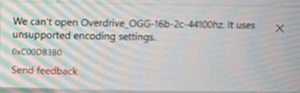
受影响的平台:
- 戴尔 14 DC14255
- 戴尔 16 DC16255
- 戴尔 16 DC16256
- 戴尔 Pro 13 Premium PA13250
- 戴尔 Pro 14 Essential PV14255
- 戴尔 Pro 14 Plus PB14250
- 戴尔 Pro 14 高端PA14250
- 戴尔 Pro Max 14 高端MA14250
- 戴尔 Pro Max 16 高端MA16250
- 戴尔 Pro Max 轻薄FCS1250
- 戴尔 Pro Max 轻薄 XE FCS1250
- 戴尔 Pro Max 塔式 T2 FCT2250
- 戴尔 Pro Max 塔式机 T2 XE FCT2250
- 戴尔 Pro Rugged 12 平板电脑RA02260
- 戴尔 Pro 轻薄 Essential QVS1260
- 戴尔 Pro 轻薄 Plus QBS1250
- 戴尔 Pro 轻薄 Plus XE QBS1250
- 戴尔 Pro 塔式机基础QVT1260
- 戴尔 Pro 塔式机 Plus QBT1250
- 戴尔 Pro 塔式机 Plus XE QBT1250
- 戴尔纤薄ECS1250
- 戴尔塔式ECT1250
Cause
错误代码 0xC00DB380 是由于 Windows 11 24H2 问题造成的。
Resolution
将计算机上的 Windows 11 操作系统更新到版本 25H2 或更高版本可解决此问题。
Affected Products
Dell 14 DC14255, Dell 16 DC16255, Dell 16 DC16256, Dell Slim ECS1250, Dell Tower ECT1250, Dell Pro Max Slim FCS1250, Dell Pro Max Slim XE FCS1250, Dell Pro Max Tower T2 FCT2250, Dell Pro Max Tower T2 XE FCT2250, Dell Pro Max 14 Premium MA14250
, Dell Pro Max 16 Premium MA16250, Dell Pro 13 Premium PA13250, Dell Pro 14 Premium PA14250, Dell Pro 14 Plus PB14250, Dell Pro 14 Essential PV14255, Dell Pro Slim Plus QBS1250, Dell Pro Slim Plus XE5 QBS1250, Dell Pro Tower Plus QBT1250, Dell Pro Tower Plus XE5 QBT1250, Dell Pro Slim Essential QVS1260, Dell Pro Tower Essential QVT1260, Dell Pro Rugged 12 Tablet RA02260
...
Article Properties
Article Number: 000305970
Article Type: Solution
Last Modified: 22 May 2026
Version: 10
Find answers to your questions from other Dell users
Support Services
Check if your device is covered by Support Services.