NetWorker:升級到 NetWorker 19.11 後,複製到雲端層的儲存集未標記為中轉
Summary: 本文說明在 NetWorker 中偵測到的缺陷,當使用 Data Domain 雲端層裝置時,可防止將新複製的儲存集正確標記為遷移至雲端。
This article applies to
This article does not apply to
This article is not tied to any specific product.
Not all product versions are identified in this article.
Symptoms
- 已成功複製至 DD 雲端層裝置的儲存集
- 經調查,NetWorker 媒體資料庫中新複製的儲存集未標記為傳輸中:NetWorker:瞭解儲存集標誌
- 由於 DD Cloud Tier 磁碟區儲存集並未遷移至雲端,作用層使用量可能會意外上升
- 從 DD 雲端層上的儲存集複製或復原會導致錯誤
- 問題會影響從 19.10 升級至 19.11 後複製到雲端層,且已停用 RPS 的儲存集
Cause
NetWorker 工程部門目前正在檢閱此問題。如果停用 RPS 複製,複製到 DD 雲端層裝置的儲存集會受到影響。此設定會顯示在 NetWorker Management Console、NetWorker 伺服器屬性中:
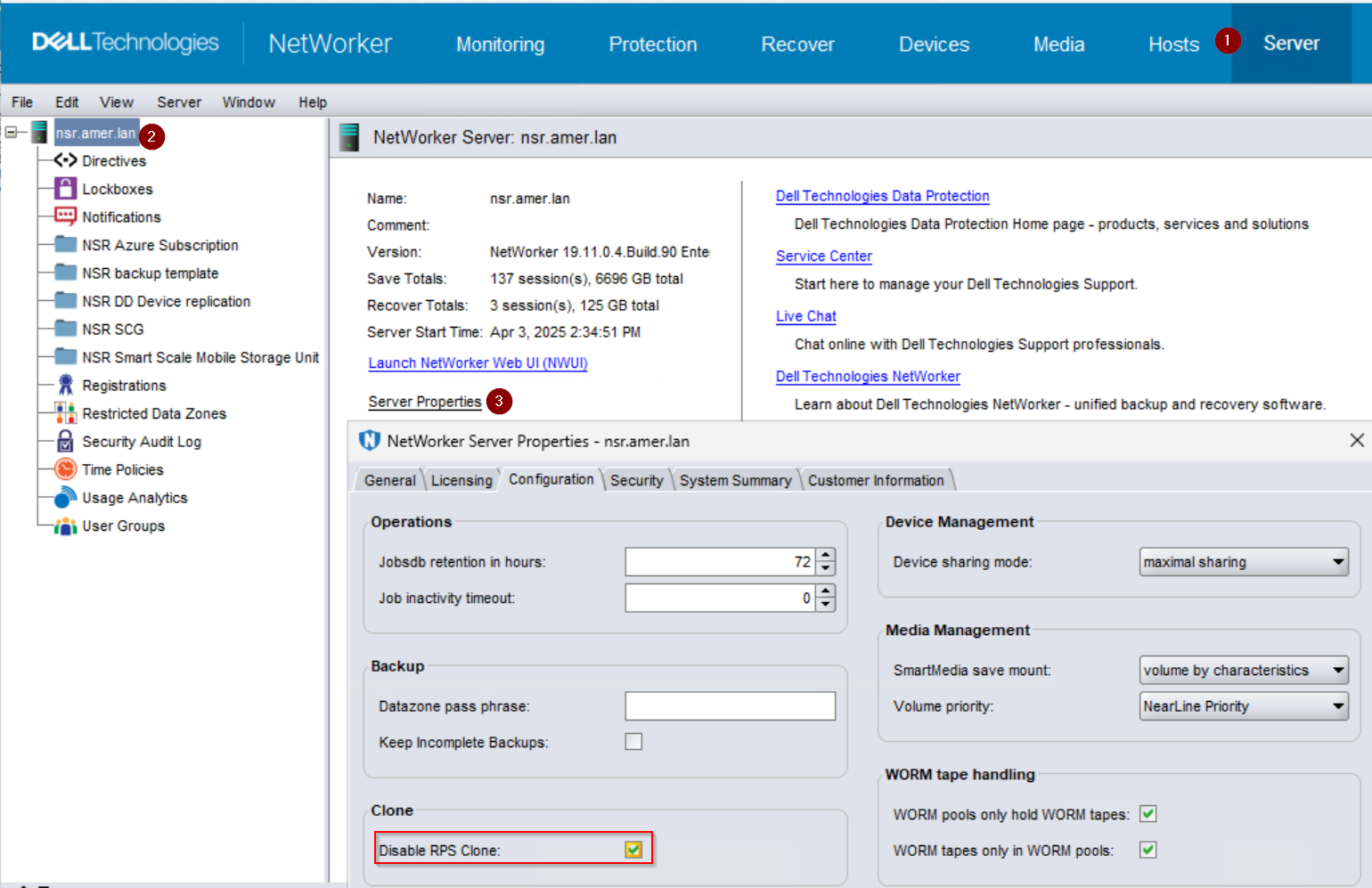
由於 NetWorker 正常解譯其媒體資料庫中缺少 Transit 旗標,導致有問題的儲存集無法讀取、復原或複製:儲存集已遷移,任何讀取作業都必須從雲端撤回。然而,由於所述的缺陷,資料從未進行遷移,因此,即使有使用中的層拷貝且可行,重新叫用嘗試還是會失敗。
Resolution
注意:瑕疵正在調查中,本文章將隨著受影響儲存集的補救方法的測試與驗證而更新。
因應措施:
請確定已取消勾選 NetWorker 伺服器上 的停用 RPS 複製 ;表示已啟用 RPS 複製。在啟用了 RPS 的情況下克隆的存儲集不會受到影響,會正確標記並遷移到雲中。此更改將立即對更改後啟動的所有克隆作業生效。受影響的存儲集不會使用正確的標誌進行追溯更新。使用 NetWorker Management Console (NMC) 或 NetWorker 伺服器 nsradmin 命令以檢查並修改此設置。
NetWorker Management Console (NMC)
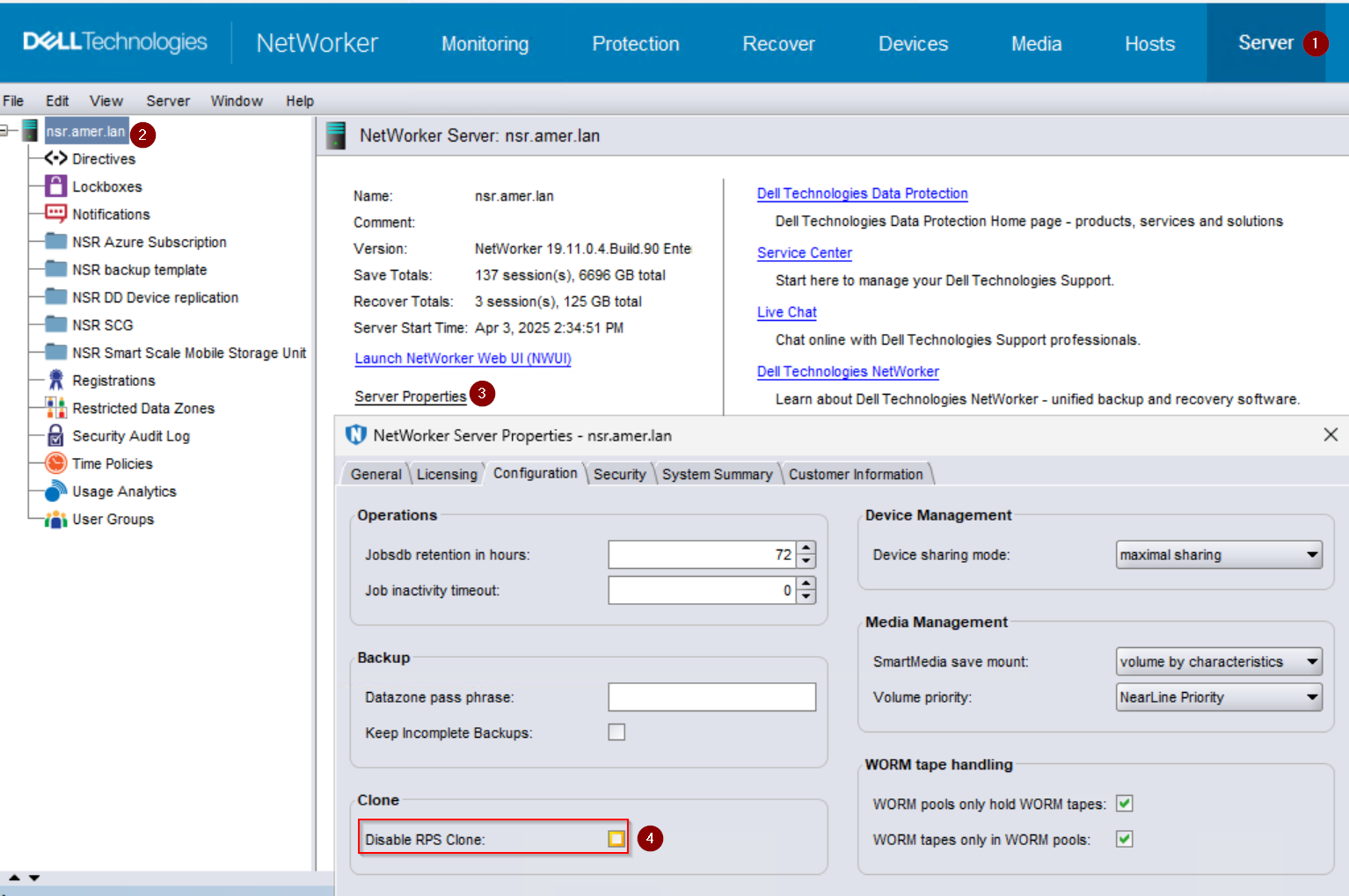
從 NMC 執行下列動作:
- 按一下 伺服器 標籤。
- 從左側功能表中選取 NetWorker 伺服器資源。
- 按一下 伺服器內容。
- 在一般 標籤中,勾選 停用 RPS 複製 選項。如果勾選了該選項,請取消選中該選項。
nsradmin
若要檢查您的環境中是否已停用 RPS 複製,請輸入 nsradmin NetWorker 伺服器上的互動式提示:
nsradmin在提示中,篩選屬性並顯示值:
nsradmin> show Disable RPS clone
nsradmin> print type: nsr
注意:值為 “是 ”表示數據區域中可能遇到缺陷。除非發生複製問題,且已在 Dell 支援的指導下停用,否則應首選值 No (否 ) 作為組態選擇。
若要重新啟用 RPS 複製,請從互動式提示中將值更新為「否」:
nsradmin> update Disable RPS Clone: No
Products
NetWorkerArticle Properties
Article Number: 000308066
Article Type: Solution
Last Modified: 06 Apr 2026
Version: 2
Find answers to your questions from other Dell users
Support Services
Check if your device is covered by Support Services.