Connectrix MDS serie: Saving RUM report from a newly implemented SAN switch reports "failure: save status: the requested item was not found"
Summary: Het opslaan van een RUM-rapport (Report Usage Metrics) van een nieuwe SAN-switch meldt het bericht "Fout: Status opslaan: het gevraagde item is niet gevonden".
This article applies to
This article does not apply to
This article is not tied to any specific product.
Not all product versions are identified in this article.
Symptoms
- Cisco-model: Multilayer Director Switch (MDS) 9396T
- NX-OS-versie: 9.4.2 bis
- Implementatie van nieuwe switch
- Geen licentie op MDS
- Switch is geconfigureerd voor SLP-topologie 5 (geen connectiviteit met CSSM en geen CSLU)
- De klant moet een smart-account maken, de smart-licentie registreren en deze koppelen aan de SAN-switches.
De volgende foutmelding wordt weergegeven bij het opslaan van een RUM-rapport met de license smart save usage all bootflash:all_rum.txt Opdracht: failure: save status: the requested item was not found
Cause
Schakel volgens Cisco TAC een functie in die ervoor zorgt dat switches licenties gebruiken om RUM-rapporten op te slaan wanneer er voor de eerste keer geen licentie wordt gebruikt. U kunt het weer uitschakelen. Na het in- en uitschakelen (zoals de ivr functie, die een Enterprise-licentie verbruikt), kunt u vervolgens het RUM-rapport opslaan met dezelfde opdracht.
Resolution
- SSH om te schakelen, in en uit te schakelen
ivrFunctie, opdrachten:
#config t
#feature ivr
#no feature ivr
#show run license
#show license status
- Voer
#license smart save usage bootflash:$(SWITCHNAME)-rum.txt - Ga naar Chrome (Cisco TAC raadt Chrome over Edge aan), open https://software.cisco.com/software/smart-licensing/alerts>tabblad "rapporten" > tabblad "gebruiksgegevensbestanden" > upload gebruiksgegevens, >kies het rum-rapport in de bootflash en klik op gegevens uploaden.
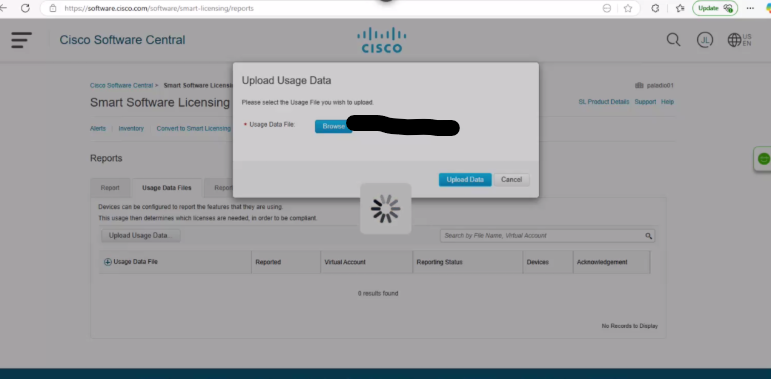
Afbeelding 1. Gebruiksdata uploaden
- Kies het virtuele account dat je nodig hebt:
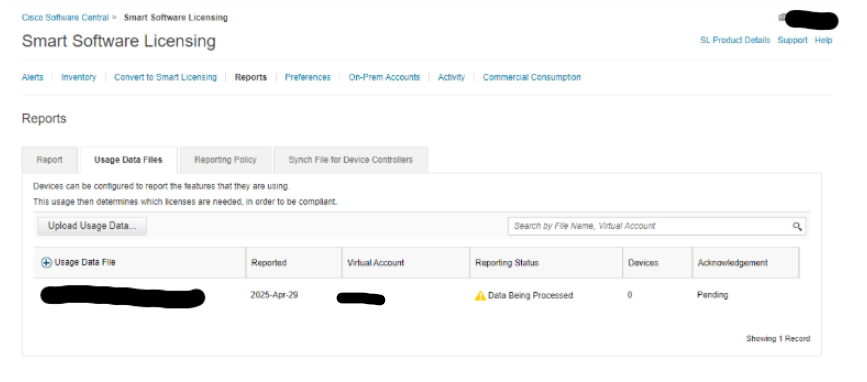
Afbeelding 2. Slimme softwarelicenties
- Wacht tot de rapportstatus wordt weergegeven
no errors. Als de pagina niet automatisch wordt bijgewerkt, vernieuwt u de pagina en klikt u op Downloaden.
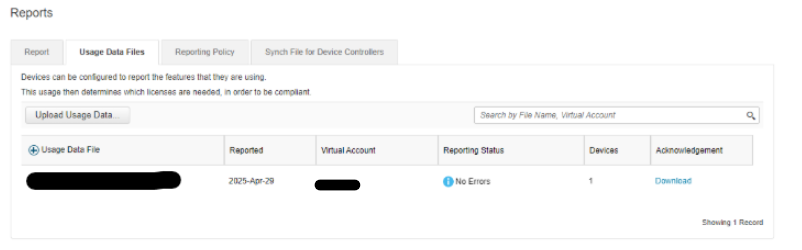
Afbeelding 3. Rapporten downloaden
- Ga met SSH naar de switch, kopieer dit RUM-rapport van TFTP naar bootflash en voer het uit.
#dir bootflash:Ga als volgt te werk om te bevestigen dat het in bootflash staat:
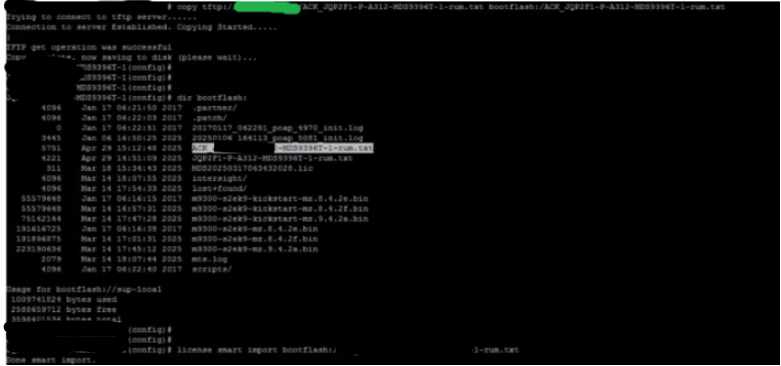
Afbeelding 4. Kopieer RUM-rapport naar bootflash
Additional Information
- EMC SR#208916105
- Cisco TAC case#699031372
Affected Products
Connectrix, Connectrix MDS-Series Firmware 9.XArticle Properties
Article Number: 000319844
Article Type: Solution
Last Modified: 15 Apr 2026
Version: 1
Find answers to your questions from other Dell users
Support Services
Check if your device is covered by Support Services.