Three Amber Six White No POST on Precision or Dell Pro Max
Summary: Learn step-by-step instructions to fix a three amber six white (3A6W) no power-on self-test (POST) error on a Precision or Dell Pro Max laptop.
This article applies to
This article does not apply to
This article is not tied to any specific product.
Not all product versions are identified in this article.
Symptoms
A Precision or Dell Pro Max laptop might experience a 3A6W no POST issue. When the computer fails to complete POST, the screen is blank. The three amber six white (3A6W) error refers to the sequence of blinking LED lights on the computer in this specific no POST issue.
Affected Platforms:
- Dell Pro Max 14 Premium MA14250
- Dell Pro Max 16 Premium MA16250
- Dell Pro Precision 7 14 PW714260
- Dell Pro Precision 7 16 PW716260
- Precision 5490
Cause
Not applicable
Resolution
- Unplug the computer battery and wait for 15 seconds.
- Plug the computer battery back in. See if the computer can turn on. If not, continue following the steps below.
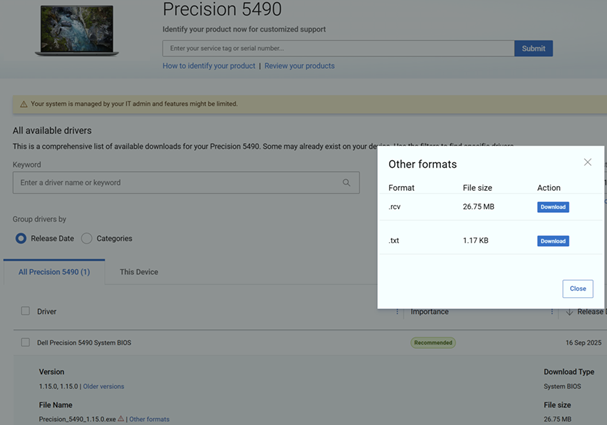
- From a different computer, download the BIOS RCV file from Dell Drivers & Downloads.
Note:
- If another computer is not available, Contact Technical Support.
- This process requires a USB storage drive. If a USB storage drive is not available, Contact Technical Support.
- From the Drivers & Downloads page, identify the computer that cannot complete POST.
- Locate the BIOS and then expand the BIOS file details.
- Click Other formats and then Download the RCV file onto a USB storage drive.
- Insert the USB drive into the computer that cannot complete POST.
- Ensure that the laptop is turned off and then disconnect the AC adapter.
- Press and hold the CTRL and ESC keys together.
- Connect the AC adapter to the laptop.
- Release the CTRL and ESC keys on the keyboard when the keyboard backlight lights up.
- Select Recover BIOS and then press Enter to initiate the recovery process.
Note: For more information, refer to Method 2: Recover BIOS from USB drive (Fallback method) in Recover BIOS on Dell Computer or Tablet After Boot or POST Failure.
Affected Products
Dell Pro Max 14 Premium MA14250, Dell Pro Max 16 Premium MA16250, Dell Pro Precision 7 14 PW714260, Dell Pro Precision 7 16 PW716260, Precision 5490Article Properties
Article Number: 000370582
Article Type: Solution
Last Modified: 14 Jul 2026
Version: 6
Find answers to your questions from other Dell users
Support Services
Check if your device is covered by Support Services.