Alienware Command Center FX -asetukset eivät toimi Alienware Area-51:ssä
Summary: Lue, miten ratkaistaan, kun Alienware Command Centerin FX-välilehden muutokset eivät näy Alienware Area-51 -tietokoneen valoissa.
This article applies to
This article does not apply to
This article is not tied to any specific product.
Not all product versions are identified in this article.
Symptoms
Alienware-tietokoneen valojen muutokset eivät välttämättä näy, kun muutokset tehdään Alienware Command Center 6.9.15.0 - version FX-välilehteen. FX-välilehti saattaa puuttua Alienware Command Centeristä.
Ympäristöt, joita tämä koskee:
- Alienware 18 Area-51 AA18250
- Alienware Area-51 AAT2250
- Alienware Area-51 AAT2265
Ohjelmistot, joita haavoittuvuus koskee:
- Alienware Command Center 6.9.15.0 -versio
Käyttöjärjestelmät, joita asia koskee:
- Windows 11
Cause
Ongelma voi johtua yhteensopivuusongelmista tai puuttuvista riippuvuuksista, kun Alienware Command Center asennetaan tehtaalla asennettuun näköistiedostoon.
Resolution
- Aloita Alienware Command Centerin korjaus valitsemalla Asetuksista Asennetut sovellukset.
- Valitse Alienware Command Center -sovellus ja valitse Muokkaa-vaihtoehto , niin voit käyttää korjausominaisuuksia.
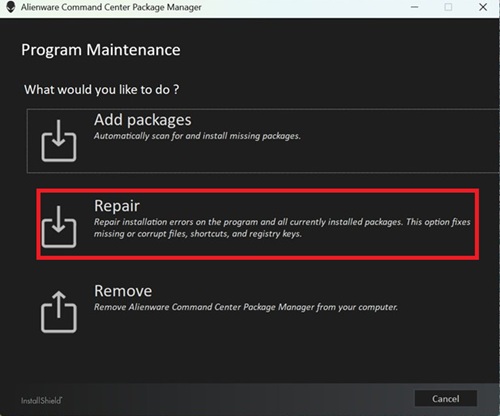
- Valitse Korjaa ja palauta valaistustehostetoiminto valitsemalla ALIENFX-komponentti .
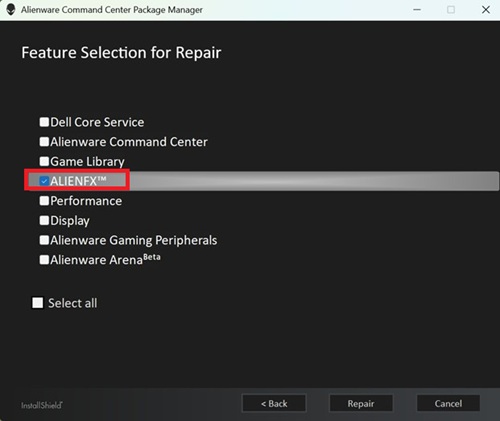
- Viimeistele korjaus noudattamalla näytön ohjeita.
- Käynnistä tietokone uudelleen ja tarkista, näkyykö FX-välilehti Alienware Command Centerissä.
- Jos FX-välilehti ei vieläkään ole näkyvissä, päivitä Alienware Command Centerin uusimpaan versioon. Lisätietoja päivittämisestä uusimpaan Alienware Command Center -versioon on käyttöoppaassa kohdassa Alienware Command Center -tuki: oppaat ja asiakirjat.
Affected Products
Alienware 18 Area-51 AA18250, Alienware Area-51 AAT2250, Alienware Area-51 AAT2265Article Properties
Article Number: 000373023
Article Type: Solution
Last Modified: 29 Jul 2026
Version: 5
Find answers to your questions from other Dell users
Support Services
Check if your device is covered by Support Services.