Alienware Command Center FX 設定無法在 Alienware Area-51 上運作
Summary: 瞭解如何解決在 Alienware Command Center 的 FX 標籤中所做的變更,而 Alienware Area-51 電腦的指示燈上看不到時。
This article applies to
This article does not apply to
This article is not tied to any specific product.
Not all product versions are identified in this article.
Symptoms
在 Alienware Command Center 6.9.15.0 版的 FX 標籤中進行變更時,可能不會看到 Alienware 電腦指示燈的變更。在某些情況下,Alienware Command Center 的 FX 標籤可能會遺失。
受影響的平台:
- Alienware 18 Area-51 AA18250
- Alienware Area-51 AAT2250
- Alienware Area-51 AAT2265
受影響的軟體:
- Alienware Command Center 6.9.15.0 版
受影響的作業系統:
- Windows 11
Cause
此問題的根源可能是相容性問題,或原廠安裝映像中安裝 Alienware Command Center 期間缺少相依性。
Resolution
- 前往「設定」中的已安裝應用程式,開始 Alienware Command Center 的修復程序。
- 選取 Alienware Command Center 應用程式,然後選擇「修改 」選項以存取修復功能。
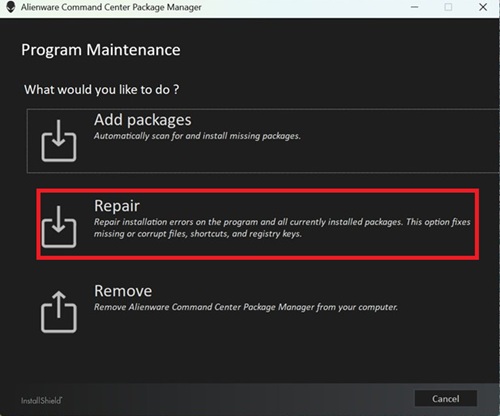
- 選擇 「修復」, 然後選取 ALIENFX 元件以還原燈光效果功能。
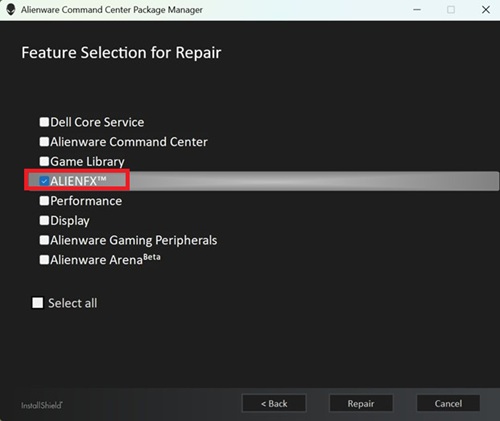
- 請按照螢幕上的任何步驟完成修復。
- 重新開機電腦,然後檢查 FX 標籤現在是否顯示在 Alienware Command Center 中。
- 如果仍看不到 FX 標籤,請更新至最新版本的 Alienware Command Center。如需有關更新至 Alienware Command Center 最新版本的資訊,請參閱支援 Alienware Command Center 手冊與文件上的使用者指南。
Affected Products
Alienware 18 Area-51 AA18250, Alienware Area-51 AAT2250, Alienware Area-51 AAT2265Article Properties
Article Number: 000373023
Article Type: Solution
Last Modified: 29 Jul 2026
Version: 5
Find answers to your questions from other Dell users
Support Services
Check if your device is covered by Support Services.