Dell Optimizer Thermal Management Mode Switches to Another Mode Automatically
Summary: Learn why the Thermal Management mode switches automatically in Dell Optimizer.
This article applies to
This article does not apply to
This article is not tied to any specific product.
Not all product versions are identified in this article.
Symptoms
Thermal Management mode may switch to another mode automatically in Dell Optimizer. After selecting Optimized or Cool mode, after normal usage it switches to another mode such as Quiet.
Affected Platform:
- Dell Pro Precision 5 14 PW514261
Cause
Since Windows 11 24H2 2024.9D, Windows has started to support a new set of Application Programming Interface (APIs) for power mode notifications. It is targeting better communication between platform, firmware, and Windows Kernel regarding power mode changes. The Dell Optimizer thermal management mode is synchronizing with OS power mode setting and BIOS thermal management setting, and all these three are interrelated and influenced on another.
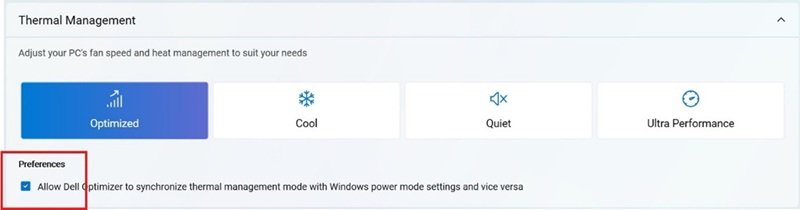
There is a checkbox under Preferences in the Dell Optimizer Power & Battery section. The Preferences checkbox is default enabled to allow Dell Optimizer for synchronizing thermal management mode with the Windows power mode setting and conversely.
Resolution
This behavior is working as designed. If this feature is not preferred, disable the Preferences checkbox in Dell Optimizer Power & Battery section.
Affected Products
Dell Optimizer, Dell Pro Precision 5 14 PW514261Article Properties
Article Number: 000418207
Article Type: Solution
Last Modified: 01 Jun 2026
Version: 1
Find answers to your questions from other Dell users
Support Services
Check if your device is covered by Support Services.