Dell ThinOS 10 Installation Incomplete on OptiPlex 3000 Thin Client
Summary: Learn about how to complete the ThinOS 10 installation process. This may be seen when an OptiPlex 3000 Thin Client is powered on.
This article applies to
This article does not apply to
This article is not tied to any specific product.
Not all product versions are identified in this article.
Symptoms
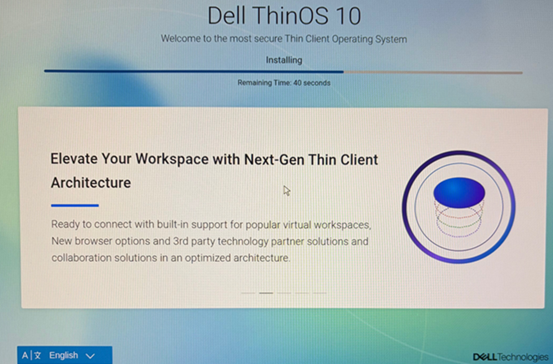
When an OptiPlex 3000 Thin Client is powered on, the ThinOS 10 installation may need to be completed. A "Dell ThinOS 10 - Welcome to the most secure Thin Client Operating System" message is seen.
Affected Platforms:
- OptiPlex 3000 Thin Client
Affected Operating Systems:
- ThinOS 10
Cause
An incomplete imaging process from the factory causes this behavior.
Resolution
Complete the installation of Dell ThinOS 10. If the installation process cannot be completed, perform a USB image recovery. For more information, click the appropriate topic.
Complete the installation
Note: The installation completion process typically takes 10 to 15 minutes. The ThinOS installation process runs automatically during this time.
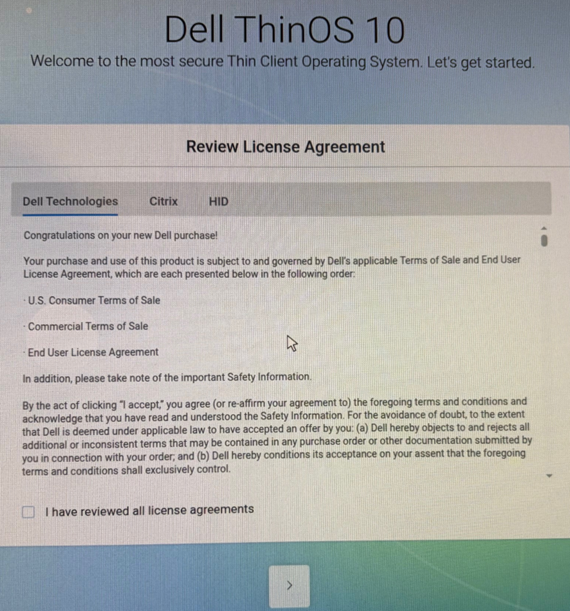
The device automatically reboots once the image installation is complete. The device displays the Review License Agreement screen after reboot.
- Select I have reviewed all license agreements and then click the > icon.
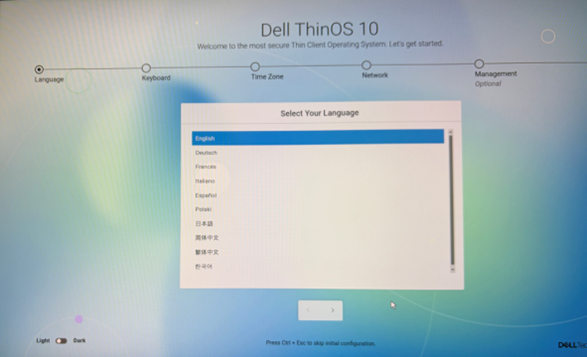
- From the Dell ThinOS 10 welcome screen, complete the device setup. Optionally, press Ctrl + ESC on the keyboard to skip the initial configuration.
USB image recovery
If a device fails to complete the ThinOS installation process after booting, perform a USB image recovery using the ThinOS 10 USB imaging process.
- For the ThinOS 10 ISO image, go to Dell Drivers & Downloads, select the device that fails to complete installation, and then locate the most recent ThinOS 10 Offline USB Installer Package.
- For installation instructions, refer to the Installation instructions on the ThinOS 10 Offline Installer Package page.
Affected Products
OptiPlex 3000 Thin ClientArticle Properties
Article Number: 000424719
Article Type: Solution
Last Modified: 24 May 2026
Version: 2
Find answers to your questions from other Dell users
Support Services
Check if your device is covered by Support Services.