DM5500:SSHサーバーで使用されているSHA1の脆弱性「SSH Weak Message Authentication Code Algorithms」
Summary: この記事では、DM5500アプライアンスのSSHサーバーでSecure Hash Algorithm 1 (SHA-1)関連の暗号を無効にする方法について説明します。PowerProtect Data Manager DM5500システムで特定された「SSH Weak Message Authentication Code (MAC) Algorithms」の脆弱性を修復するには、SHA-1関連の暗号を無効にする必要があります。 ...
This article applies to
This article does not apply to
This article is not tied to any specific product.
Not all product versions are identified in this article.
Symptoms
セキュリティ脆弱性スキャナーは、 "SSH Weak Message Authentication Code (MAC) Algorithms" DM5500アプライアンスへのSSH接続にSHA-1ベースの暗号が使用可能であることを示すアラート。
Cause
2026 年 2 月 1 日現在、SHA-1 は衝突攻撃に対する脆弱性があるため、正式には脆弱で暗号の使用には適していないと見なされています。現在のDM5500ソフトウェア リリースは、この廃止よりも前です。したがって、SHA-1 関連のアルゴリズムは SSH サーバーで引き続き有効になっています。
次のDM5500ソフトウェア リリースでは、SSH構成が強化され、SHA-1関連の暗号がすべて削除されます。
このアップデートが利用可能になるまで、お客様はDellサポートに連絡して、DM5500 SSHサーバーでSHA-1暗号を無効にする回避策を適用する必要があります。
Resolution
注:DM5500はクローズド アプライアンスです。Linuxレベルのシェル アクセスは、Dellの従業員またはパートナーに限定されています。必要に応じて、 Dellサポート または認定担当者に次の回避策を実装してもらいます。
注:お客様がシステム構成を実行した場合は、回避策を再度適用する必要があります。
- SSHを使用してDM5500に「admin」としてログインし、Linux BASHにアクセスします
- SHA-1暗号が次のSSHサーバーで使用可能であることを確認します。
sshd -T |grep -i sha1
出力例:
!!!! ppoe YOUR DATA IS IN DANGER !!!! # sshd -T |grep -i sha1 macs hmac-sha2-256-etm@openssh.com,hmac-sha2-512-etm@openssh.com,hmac-sha1-etm@openssh.com,hmac-sha2-256,hmac-sha2-512,hmac-sha1 kexalgorithms ecdh-sha2-nistp256,ecdh-sha2-nistp384,ecdh-sha2-nistp521,diffie-hellman-group-exchange-sha256,diffie-hellman-group14-sha1 !!!! ppoe YOUR DATA IS IN DANGER !!!! # - 次のディレクトリーのコピーを作成します。
/etc/ssh/sshd_configファイルの作成には、次のコマンドを使用します。
cp -p /etc/ssh/sshd_config /etc/ssh/sshd_config.default - 次の 2 行を
/etc/ssh/sshd_configファイルの下のHostKeyエントリ:
MACs hmac-sha2-512-etm@openssh.com,hmac-sha2-512,hmac-sha2-256-etm@openssh.com,hmac-sha2-256
kexalgorithms ecdh-sha2-nistp256,ecdh-sha2-nistp384,ecdh-sha2-nistp521,kex-strict-s-v00@openssh.com
予想される変更元: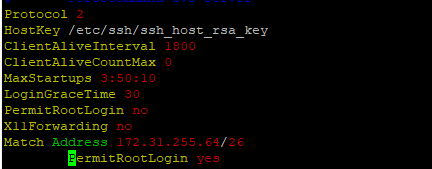
To:
- 次のコマンドを使用してSSHサーバーを再起動します。
systemctl restart sshd - 再起動後にSSHサーバーが稼働(アクティブ)していることを確認します。
systemctl status sshd
予期される出力:
!!!! ppoe YOUR DATA IS IN DANGER !!!! # systemctl status sshd ● sshd.service - OpenSSH Daemon Loaded: loaded (/usr/lib/systemd/system/sshd.service; enabled; vendor preset: disabled) Active: active (running) since Mon 2026-03-09 05:01:09 UTC; 5min ago Process: 54258 ExecStartPre=/usr/sbin/sshd -t $SSHD_OPTS (code=exited, status=0/SUCCESS) Process: 54255 ExecStartPre=/usr/sbin/sshd-gen-keys-start (code=exited, status=0/SUCCESS) Main PID: 54261 (sshd) Tasks: 1 Memory: 1.9M CPU: 2.939s CGroup: /system.slice/sshd.service └─54261 /usr/sbin/sshd -D ... skipped ... !!!! ppoe YOUR DATA IS IN DANGER !!!! # - SHA-1暗号が使用されなくなったことを確認します。
sshd -T |grep -i sha1 - DM5500への新しいSSHセッションを開き、ユーザーがDM5500に正常にログインできることを確認します。
Affected Products
PowerProtect Data Manager Appliance, PowerProtect DM5500Article Properties
Article Number: 000436070
Article Type: Solution
Last Modified: 16 Mar 2026
Version: 1
Find answers to your questions from other Dell users
Support Services
Check if your device is covered by Support Services.