DM5500:用於 SSH 伺服器的 SHA1 漏洞「SSH 弱訊息驗證碼演算法」
Summary: 本文說明如何在 DM5500 裝置的 SSH 伺服器上停用安全雜湊演算法 1 (SHA-1) 相關加密。必須停用 SHA-1 相關加密,才能補救 PowerProtect Data Manager DM5500 系統上識別的「SSH 弱訊息驗證碼 (MAC) 演算法」漏洞。
This article applies to
This article does not apply to
This article is not tied to any specific product.
Not all product versions are identified in this article.
Symptoms
安全漏洞掃描器可能會回報 "SSH Weak Message Authentication Code (MAC) Algorithms" 警示指出 SHA-1 型加密可用於 SSH 連線至 DM5500 裝置。
Cause
截至 2026 年 2 月 1 日,SHA-1 由於容易受到衝突攻擊,因此被正式認為是弱的,不適合加密使用。目前的 DM5500 軟體版本早於此棄用。因此,SSH 伺服器中仍會啟用與 SHA-1 相關的演算法。
在下一個 DM5500 軟體版本中,將加強 SSH 配置,並刪除所有與 SHA-1 相關的密碼。
在更新可用之前,客戶應聯絡 Dell 支援,以套用在 DM5500 SSH 伺服器上停用 SHA-1 加密的因應措施。
Resolution
注意:DM5500 是封閉式設備;Linux 級 Shell 存取僅限 Dell 員工或合作夥伴使用。如有需要,請聯絡 Dell 支援 或授權人員以實作下列因應措施。
注意:如果客戶執行系統設定,則必須再次套用因應措施。
- 透過 SSH 以「admin」身分登入 DM5500,並存取 Linux BASH
- 檢查 SHA-1 加密在以下 SSH 伺服器中是否可用:
sshd -T |grep -i sha1
範例輸出:
!!!! ppoe YOUR DATA IS IN DANGER !!!! # sshd -T |grep -i sha1 macs hmac-sha2-256-etm@openssh.com,hmac-sha2-512-etm@openssh.com,hmac-sha1-etm@openssh.com,hmac-sha2-256,hmac-sha2-512,hmac-sha1 kexalgorithms ecdh-sha2-nistp256,ecdh-sha2-nistp384,ecdh-sha2-nistp521,diffie-hellman-group-exchange-sha256,diffie-hellman-group14-sha1 !!!! ppoe YOUR DATA IS IN DANGER !!!! # - 製作
/etc/ssh/sshd_config使用下列命令的檔案:
cp -p /etc/ssh/sshd_config /etc/ssh/sshd_config.default - 新增以下兩行
/etc/ssh/sshd_config檔案下方HostKey項目:
MACs hmac-sha2-512-etm@openssh.com,hmac-sha2-512,hmac-sha2-256-etm@openssh.com,hmac-sha2-256
kexalgorithms ecdh-sha2-nistp256,ecdh-sha2-nistp384,ecdh-sha2-nistp521,kex-strict-s-v00@openssh.com
預期變更自: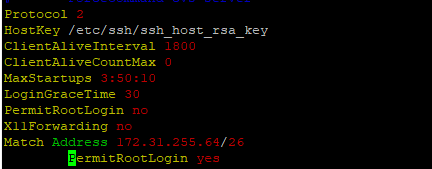
至:
- 使用下列命令重新啟動 SSH 伺服器:
systemctl restart sshd - 確認 SSH 伺服器已啟動 (使用中) 並在重新開機後執行:
systemctl status sshd
預期輸出:
!!!! ppoe YOUR DATA IS IN DANGER !!!! # systemctl status sshd ● sshd.service - OpenSSH Daemon Loaded: loaded (/usr/lib/systemd/system/sshd.service; enabled; vendor preset: disabled) Active: active (running) since Mon 2026-03-09 05:01:09 UTC; 5min ago Process: 54258 ExecStartPre=/usr/sbin/sshd -t $SSHD_OPTS (code=exited, status=0/SUCCESS) Process: 54255 ExecStartPre=/usr/sbin/sshd-gen-keys-start (code=exited, status=0/SUCCESS) Main PID: 54261 (sshd) Tasks: 1 Memory: 1.9M CPU: 2.939s CGroup: /system.slice/sshd.service └─54261 /usr/sbin/sshd -D ... skipped ... !!!! ppoe YOUR DATA IS IN DANGER !!!! # - 確認 SHA-1 加密已不再使用:
sshd -T |grep -i sha1 - 開啟新的 SSH 工作階段至 DM5500,以確認使用者可成功登入 DM5500。
Affected Products
PowerProtect Data Manager Appliance, PowerProtect DM5500Article Properties
Article Number: 000436070
Article Type: Solution
Last Modified: 16 Mar 2026
Version: 1
Find answers to your questions from other Dell users
Support Services
Check if your device is covered by Support Services.