Dell Display and Peripheral Manager Mini Installer Does Not Launch
Summary: Learn about why Dell Display and Peripheral Manager (DDPM) may not present the mini-installer prompt when a new supported Dell device is connected.
This article applies to
This article does not apply to
This article is not tied to any specific product.
Not all product versions are identified in this article.
Symptoms
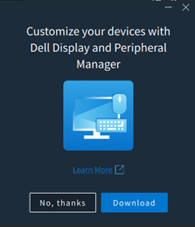
On computers running Windows, no pop-up message appears to prompt installation or update of Dell Display and Peripheral Manager when a supported Dell device is connected.
This behavior may be observed in the following situations:
- A supported Dell device is connected for the first time on a system that does not have DDPM installed.
- A new supported device is connected that requires a newer DDPM version, but no prompt appears to download or update DDPM.
Affected Software:
- Dell Display and Peripheral Manager (version 2.2.1 and later)
Affected Peripherals:
- Dell Pro 5 Keyboard and Mouse KM526
- Dell Pro 5 Mouse MS526
- Dell Pro 5 Wired Fingerprint ESS Mouse MS526C
- Dell Pro 7 Silent Mouse MS726
- Dell Pro 7 Slim Keyboard and Mouse KM726
Affected Operating Systems:
- Windows
Cause
This is expected behavior. The previous mini-installer experience has been removed and is no longer presented when supported devices are connected.
Resolution
This is a design change. The mini-installer has been removed from DDPM version 2.2.1.
Affected Products
Dell Display and Peripheral Manager, Dell Pro 5 Keyboard and Mouse KM526, Dell Pro 7 Slim Keyboard and Mouse KM726, Dell Pro 5 Mouse MS526, Dell Pro 5 Wired Fingerprint ESS Mouse MS526C, Dell Pro 7 Silent Mouse MS726Article Properties
Article Number: 000442074
Article Type: Solution
Last Modified: 24 May 2026
Version: 2
Find answers to your questions from other Dell users
Support Services
Check if your device is covered by Support Services.