Chromebook Stuck in Developer Mode
Summary: This article provides information about the Chromebook unable to boot and stuck in Developer Mode.
This article applies to
This article does not apply to
This article is not tied to any specific product.
Not all product versions are identified in this article.
Symptoms
Affected Platforms:
- Chromebook 3120
- Dell Chromebook 11 CC11260
- Dell Chromebook 14 CC14260
The Chromebook may have modified the Google Binary Block (GBB) value and switched to developer mode; The enrollment environment is also disabled booting in Developer Mode, after enrolled, the Chromebook is unable to boot to Developer Mode or Secure Mode.
The following messages are displayed:
The Device owner has disabled Developer Mode for this device. Please ask the device owner to remove the restriction if you want to use Developer Mode.
The system will reboot in Verified Mode.
Followed by:
Returning to secure mode disallowed by GBB flags.
Cause
- The Chromebook is unable to boot in Developer Mode: The enrolled environment does not allow booting in Developer Mode; it reverts to Secure Mode.
- Then the Chromebook is unable to boot in Secure Mode, because the GBB flag value is not the default value 0x0.
Resolution
Workaround:
- IT must approve unenrolling the Chromebook or enable Developer Mode in the enrollment setting: Approval from the enrollment administrator
- Set the GBB flag to 0x0:
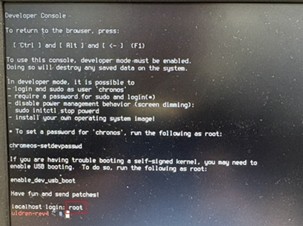
- Enter ChromeOS using developer mode, switch to VT2 (hotkey: CTRL + ALT + plus (+) key)
- Login as
root
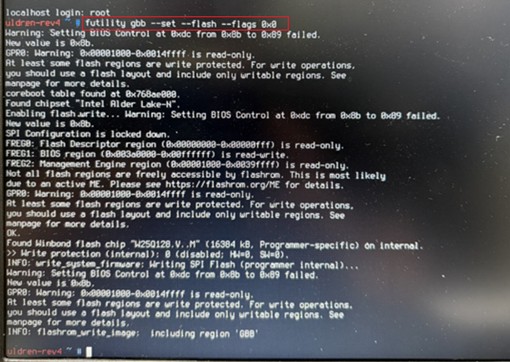
- Type:
futility gbb --set --flash --flags 0x0
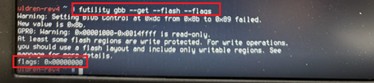
- Confirmed that the GBB flags value is 0x0, type:
futility gbb --get --flash –flags
- Switch mode from developer to secure:
- Reboot the Chromebook, then select Return to secure mode
- Select Confirm
The Chromebook is reenrolled at this point. Enrollment administrator must provide their approval.
Affected Products
Chromebook 3120, Dell Chromebook 11 CC11260, Dell Chromebook 14 CC14260Article Properties
Article Number: 000468050
Article Type: Solution
Last Modified: 25 May 2026
Version: 3
Find answers to your questions from other Dell users
Support Services
Check if your device is covered by Support Services.