3DMark 電腦閒置後時間間諜性能下降
Summary: 瞭解為何 Dell 筆記型電腦閒置約 15 分鐘後,3DMark Time Spy 的效能指標分數可能會下降。
This article applies to
This article does not apply to
This article is not tied to any specific product.
Not all product versions are identified in this article.
Symptoms
運行 3DMark 時間間諜基準測試可能會在啟動電腦、連接到互聯網,然後讓電腦空閒約 15 分鐘後顯示性能分數下降超過 10%。
受影響的平台:
- Dell 14S DS14265
- Dell 16S DS16265
- Dell Pro 3 14 P314265
- Dell Pro 3 16 P316265
- Dell Pro 5 14 P514265
- Dell Pro 5 16 P516265
- Dell Pro 7 13 P703265
- Dell Pro 7 13 P713265
- Dell Pro 7 14 二合一P704265
- Dell Pro 7 14 P714265
- Dell Pro Precision 5 14S PW514265
- Dell Pro Precision 5 16S PW516265
Cause
內建的 Windows AI 功能會在背景執行,並使用大量的電腦記憶體。即使電腦處於閒置狀態,也會發生這種情況。在具有 16 GB 記憶體的電腦上,此功能最多可使用總記憶體的 60–65%。
受影響的 Dell 筆記型電腦使用共用記憶體來顯示圖形。這意味著圖形處理器與計算機的其餘部分共用記憶體,而不是擁有自己的專用記憶體。當可用記憶體不足時,圖形性能可能會受到影響。
注意:Microsoft 已確認此背景記憶體使用方式為預期行為。
Resolution
長期解決方案:
工程部門正在開發修復程式,以便在未來的 BIOS 版本中發佈。更新的 BIOS 會在可用後發佈到電腦的支援頁面。BIOS 預計於 2026 年 8 月 11 日發佈。
因應措施:
- 開啟 AMD 軟體:腎上腺素版。
注意:AMD 軟體的版本可能會有所不同。
- 前往 效能 ,然後前往 調整。
- 將可變圖形記憶體從最小更改為中。
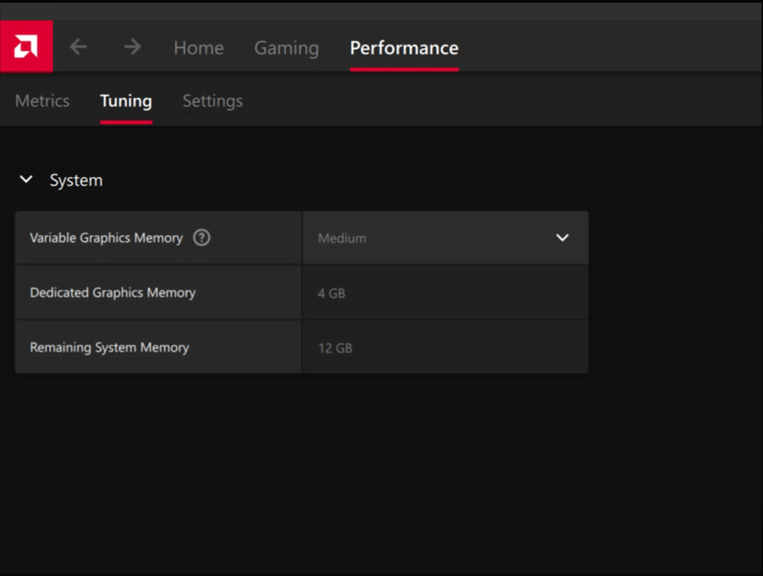
Affected Products
Dell 14S DS14265, Dell 16S DS16265, Dell Pro 3 14 P314265, Dell Pro 3 16 P316265, Dell Pro 5 14 P514265, Dell Pro 5 16 P516265, Dell Pro 7 13 2-in-1 P703265, Dell Pro 7 14 2-in-1 P704265, Dell Pro 7 13 P713265, Dell Pro 7 14 P714265
, Dell Pro Precision 5 14S PW514265, Dell Pro Precision 5 16S PW516265
...
Products
Dell Pro Precision 5 14S PW514265, Dell Pro Precision 5 16S PW516265Article Properties
Article Number: 000472116
Article Type: Solution
Last Modified: 02 Jun 2026
Version: 2
Find answers to your questions from other Dell users
Support Services
Check if your device is covered by Support Services.