PowerStore: Orphaned Snapshots Detected
Summary: This article describes the PowerStore "Detected orphan snapshots" alert.
This article applies to
This article does not apply to
This article is not tied to any specific product.
Not all product versions are identified in this article.
Symptoms
PowerStore raises the alert 0x03700103 for:
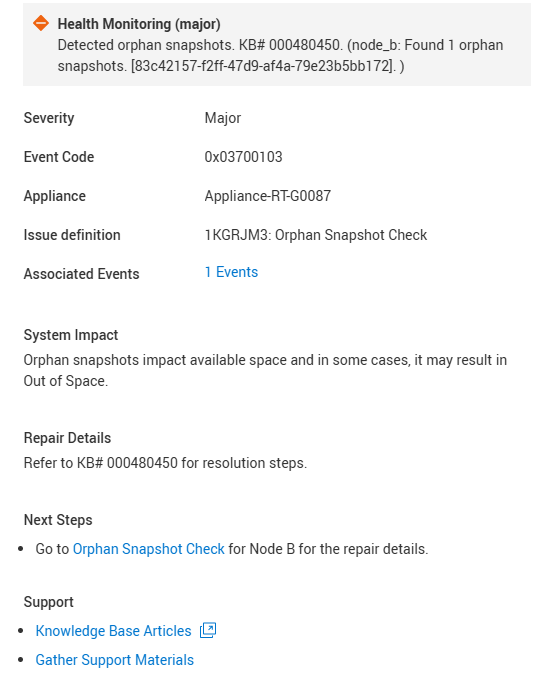
Figure 1. Health Check Alert
"Detected orphan snapshots. KB# 000480450."Cause
In certain scenarios, snapshots may continue to exist in the Data Path (DP) after their corresponding Control Path (CP) objects have been removed or were never created. These are referred to as orphan snapshots. Without a corresponding CP object, these snapshots remain in the Data Path indefinitely and are never deleted. Such orphan snapshots take space and may result in an Out of Space (OOS) scenario.
Known scenarios leading to orphan snapshots:
- Dual Data Path panic during snapshot creation — A snapshot object is created in DP, but the corresponding CP command fails without rolling back the DP snapshot.
- Communication failure between local and remote sites (Metro configurations) — Metro recovery snapshots are created in DP, but their corresponding CP objects are not created due to inter-site communication issues. These DP snapshots are then never deleted.
Resolution
This check does not support Auto-Repair. Deleting snapshots is a sensitive operation and requires explicit customer approval to mitigate the risk of removing important data.
Contact Technical Support to determine the best course of action. Mention this KB article ID to expedite processing.
Additional Information
See KB article PowerStore: Landing Page for RxDefinitions Issues for more information about the health check mechanism, the RxDefinitions package, and a complete list of RxDefinitions alerts.
Affected Products
PowerStoreArticle Properties
Article Number: 000480450
Article Type: Solution
Last Modified: 29 Jul 2026
Version: 3
Find answers to your questions from other Dell users
Support Services
Check if your device is covered by Support Services.