Dell NativeEdge: How to Setup Consumer Graphics Processing Unit (GPU) Passthrough for NativeEdge Endpoints
Summary: Instructions for the configuration of Graphics Processing Unit (GPU) Passthrough for consumer (GPU) on NativeEdge Endpoints
Instructions
To use GPU passthrough with consumer GPU like NVIDIA RTX on NativeEdge Endpoints, the user needs to passthrough additional PCIe devices also.
In the blueprint, you must specify the additional PCIe device that is present on the GPU. For example, the GA106 High Definition Audio Controller must be included for the GPU to passthrough correctly.
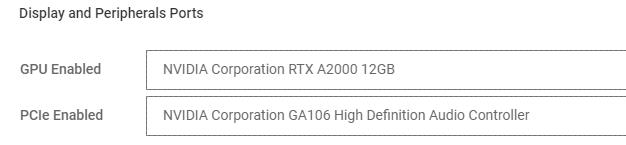
Important:
If there are multiple consumer GPU present, select the relevant controller that is mapped to the same port/slot as the GPU that is passed through.
Additional Information
During the deployment of a virtual machine (VM) with NVIDIA RTX GPU passthrough, the system generates messages like the one below when the Audio Controller is not included among the devices assigned to the VM:-
Please ensure all devices within the IOMMU group are bound to their VFIO bus driver
Input-Output Memory Management Unit (IOMMU) is a hardware feature that allows a virtual machine to directly access hardware devices (like GPUs or NICs) securely and efficiently.
Devices on the PCI bus are grouped into IOMMU groups. Devices in the same group cannot be isolated from each other by the IOMMU, so they must be passed through together to a VM or not at all.
VFIO is a Linux kernel driver that allows safe, direct device access from user space. It is used to assign PCI devices to virtual machines.