Avamar: VM image backups fail with "No Proxy" because vCenter proxy is powered off
Resumen: Avamar VM image backups fail with "No Proxy" because the proxy is powered off in vCenter.
Este artículo se aplica a:
Este artículo no se aplica a:
Este artículo no está vinculado a ningún producto específico.
En este artículo no se identifican todas las versiones de los productos.
Síntomas
The Activity Monitor in the Avamar UI shows 'No Proxy'.
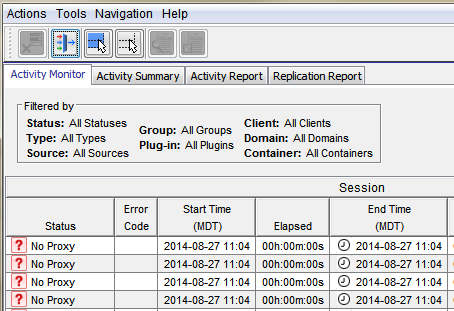
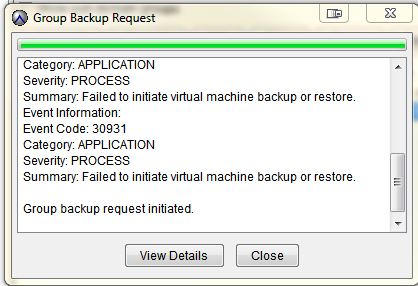
On-demand VMware Image backup fails with the following:
Category: APPLICATION
Severity: PROCESS
Summary: Failed to initiate virtual machine backup or restore.
Event Information:
Event Code: 30931
Category: APPLICATION
Severity: PROCESS
Summary: Failed to initiate virtual machine backup or restore.
If a group backup request is initiated.
Causa
The proxy is powered off in vCenter.
Resolución
- Open vCenter and check if the proxy is powered off.
- If the proxy is powered off, power on the proxy.
Información adicional
The following articles discuss issues which have the same generic "No Proxy" error.
- Avamar VM image backups fail with "No Proxy" because no proxy servers are configured to protect the datastore holding the client’s VMDKs
- Avamar VM image backups fails with "No Proxy" error due to an interruption to the vCenter connection
- Avamar VM image backups fails with "No Proxy" error due to the VM not having any hard disks
- Avamar VM image backups fails with "No Proxy" error due to the proxy being powered off in vCenter
- Avamar VM image backups fail with "No Proxy" error due to proxies not resolving in DNS
Productos afectados
AvamarProductos
AvamarPropiedades del artículo
Número de artículo: 000033569
Tipo de artículo: Solution
Última modificación: 05 feb 2025
Versión: 4
Encuentra las respuestas que necesitas con la ayuda de otros usuarios de Dell
Servicios de asistencia
Comprueba si tu dispositivo está cubierto por los servicios de asistencia.