Dell Unity: No se puede detectar un puerto Ethernet o una agregación de enlaces en los que se configuró la interfaz de red del servidor NAS
Resumen: La replicación asíncrona física remota debe coincidir con el lado de origen; de lo contrario, se requiere un reemplazo.
Este artículo se aplica a:
Este artículo no se aplica a:
Este artículo no está vinculado a ningún producto específico.
En este artículo no se identifican todas las versiones de los productos.
Síntomas
Un usuario de Unity recibe el siguiente mensaje de error en Unisphere en el sitio de recuperación ante desastres:
The system is unable to detect an Ethernet port or link aggregation on which the NAS server network interface was configured. Switch the interface to use another Ethernet port or link aggregation. If this does not help, restart the management software. If the problem persists, contact your service provider.
Causa
No hay ninguna interfaz física coincidente en el origen para el servidor NAS especificado. Como resultado, no puede realizar la conmutación por error correctamente.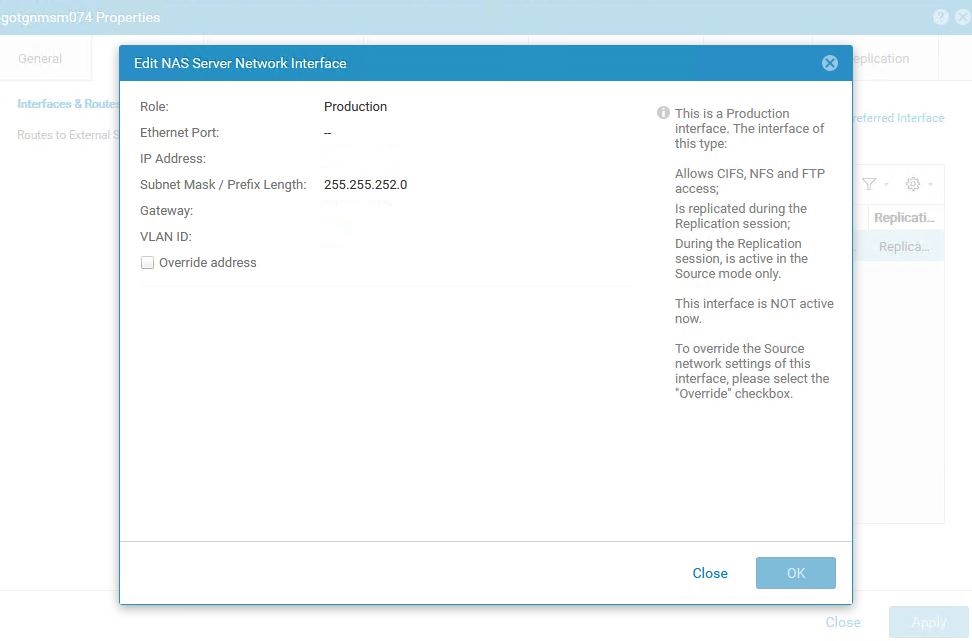
Tenga en cuenta que las IP se eliminaron intencionalmente; sin embargo, la toma clave es el puerto Ethernet faltante (guión)
Resolución
- En el arreglo de destino del servidor NAS afectado, abra las propiedades del servidor NAS.
- Elija la pestaña Red , seleccione la dirección IP asignada y elija Editar.
- En la ventana Edit NAS Server Interface que aparece, seleccione la casilla de verificación Override IP , configure la misma IP que el servidor NAS de producción en una interfaz o red física diferente o especifique una IP diferente con una interfaz física diferente. Seleccione la interfaz de red física adecuada de su elección.

Captura de pantalla de la casilla de verificación Override Address activada. Anote todas las direcciones IP eliminadas de la captura de pantalla.
Información adicional
Errores de evaluación del estado previa a la actualización:
ERROR_CODE=dm::check_nas_servers_health_2|Error|nasservervdm4 - The system is unable to detect an Ethernet port or link aggregation on which the NAS server network interface was configured. Switch the interface to use another Ethernet port or link aggregation. If this does not help, restart the management software. If the problem persists, contact your service provider. (https://10.xxx.x.xx/help/webhelp/en_US/index.html?
uemcli /net/nas/server show -detail output showing the same error condition :
1:    ID                                          = nas_23
      Name                                        = nasservervdm4
      NetBIOS name                                = nasservervdm4
      SP                                          = spa
      Storage pool                                = pool_2
      Tenant                                      =
      Interface                                   = if_40
      NFS enabled                                 = yes
      NFSv3 enabled                               = yes
      NFSv4 enabled                               = no
      CIFS enabled                                = yes
      Workgroup                                   =
      Windows domain                              = removed.domain.com
      Multiprotocol sharing enabled               = yes
      Unix directory service                      = localThenNis
      Auto user mapping enabled                   = enabled
      Default Unix user                           = N/A
      Default Windows username                    =
      Extended Unix credentials enabled           = no
      Credentials cache retention                 = 15m
      Username translation                        = no
      Packet Reflect enabled                      = no
      Health state                                = Major failure (20)
      Health details                              = "The system is unable to detect an Ethernet port or link aggregation on which the NAS server network interface was configured. Switch the interface to use another Ethernet port or link aggregation. If this does not help, restart the management software. If the problem persists, contact your service provider. (https://10.x.xx.x.x/help/webhelp/en_US/index.html?#unity_t_manage_ns_interfaces_default_rtes.html)"
      Type                                        = 64
      Replication type                            = remote
      Synchronous replication type                = none
      Replication destination                     = yes
      Backup only                                 = yes
      Migration Destination                       = no
      Preferred production interfaces overridden  = Auto synchronized
      Preferred production IPv4 interface         = auto
      Preferred production IPv6 interface         = auto
      Preferred backup and DR test IPv4 interface = auto
      Preferred backup and DR test IPv6 interface = auto
      Source preferred production IPv4 interface  = auto
      Source preferred production IPv6 interface  = auto
      File space used                             = 69085582229504 (62.8T)
      Compression space saved                     = 0
      Compression percent                         = 0%
      Compression ratio                           = 1.0:1
      Data Reduction space saved                  = 0
      Data Reduction percent                      = 0%
      Data Reduction ratio                        = 1.0:1
Productos afectados
Dell EMC Unity FamilyProductos
Dell Unity 300, Dell EMC Unity 300F, Dell EMC Unity 350F, Dell EMC Unity XT 380, Dell EMC Unity XT 380F, Dell EMC Unity 400, Dell EMC Unity 400F, Dell EMC Unity 450F, Dell EMC Unity XT 480, Dell EMC Unity XT 480F, Dell EMC Unity 500
, Dell EMC Unity 500F, Dell EMC Unity 550F, Dell EMC Unity 600, Dell EMC Unity 600F, Dell EMC Unity 650F, Dell EMC Unity XT 680, Dell EMC Unity XT 680F, Dell EMC Unity XT 880, Dell EMC Unity XT 880F, Dell EMC Unity Family |Dell EMC Unity All Flash, Dell EMC Unity Family, Dell EMC Unity Hybrid
...
Propiedades del artículo
Número de artículo: 000060348
Tipo de artículo: Solution
Última modificación: 26 sept 2025
Versión: 4
Encuentra las respuestas que necesitas con la ayuda de otros usuarios de Dell
Servicios de asistencia
Comprueba si tu dispositivo está cubierto por los servicios de asistencia.