Dell Command | Configure Toolkit Returns an Error When Setting Secure Boot Mode to Audit Mode
Resumen: This article provides information about Dell Command | Configure Toolkit returning an error when setting Secure Boot Mode to Audit Mode by Dell Command | Configure Toolkit.
Este artículo se aplica a:
Este artículo no se aplica a:
Este artículo no está vinculado a ningún producto específico.
En este artículo no se identifican todas las versiones de los productos.
Síntomas
Dell Command | Configure Toolkit Returns an Error
The Dell Command | Configure Toolkit (CCTK) cannot set the Secure Boot Mode to Audit Mode and returns an error log.
XXXX/XX/XX XX:XX:XX cctk - Option : SecureBootMode
XXXX/XX/XX XX:XX:XX cctk - Error in Setting the Value
Causa
Resolución
Go to BIOS setup to Enable Custom Mode and Delete All Keys first then CCTK can set the Secure Boot Mode.
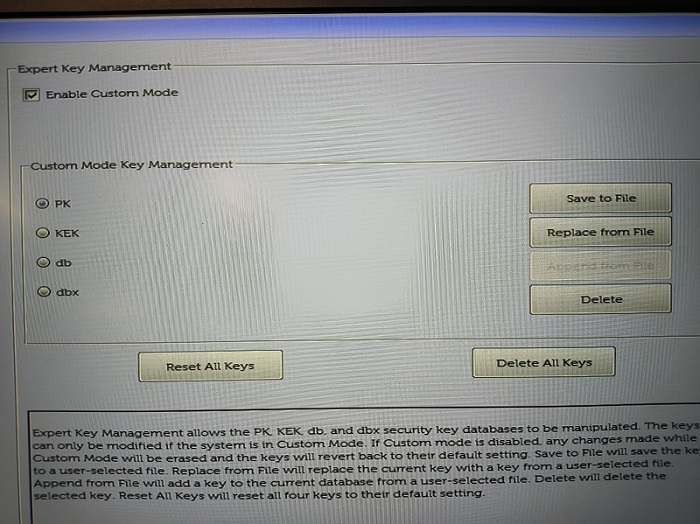
(Figure 1 - BIOS Setup)
Productos afectados
OptiPlex, Latitude, Dell Command | ConfigurePropiedades del artículo
Número de artículo: 000205212
Tipo de artículo: Solution
Última modificación: 24 abr 2025
Versión: 9
Encuentra las respuestas que necesitas con la ayuda de otros usuarios de Dell
Servicios de asistencia
Comprueba si tu dispositivo está cubierto por los servicios de asistencia.