Dell Unity: How to connect to Unity XT platforms over serial connection
Resumen: Unity XT arrays (excluding XT 380/380F) have a micro serial port in the back that can be used for a direct connection into each SP.
Este artículo se aplica a:
Este artículo no se aplica a:
Este artículo no está vinculado a ningún producto específico.
En este artículo no se identifican todas las versiones de los productos.
Instrucciones
Unity XT arrays (excluding XT 380/380F) have a micro serial port in the back that can be used for a direct connection into the SP. This type of connection can be used instead of IPMI. However both cannot be used simultaneously.
A Micro DB-9 serial cable can be used to connect a computer directly to an SP.
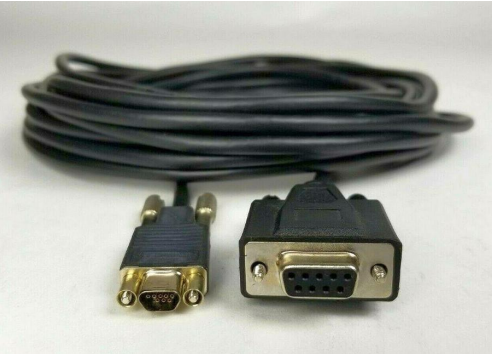
For computers that do not have a serial port a USB to DB-9 serial adapter cable can be used alongside the Micro DB-9 serial cable.

Location of serial port on each SP

Once the serial port is connected on the array open a terminal, select serial connection. Before connecting adjust the speed to 115200.
Note: Verify what COM represents the physical serial connection. Sometimes a different COM port is selected by default.

In the event strange output in the terminal is seen, turn the flow control off.

Once the putty session is opened, a login screen should be seen.

A Micro DB-9 serial cable can be used to connect a computer directly to an SP.
For computers that do not have a serial port a USB to DB-9 serial adapter cable can be used alongside the Micro DB-9 serial cable.
Location of serial port on each SP
Once the serial port is connected on the array open a terminal, select serial connection. Before connecting adjust the speed to 115200.
Note: Verify what COM represents the physical serial connection. Sometimes a different COM port is selected by default.
In the event strange output in the terminal is seen, turn the flow control off.
Once the putty session is opened, a login screen should be seen.
Productos afectados
Dell EMC Unity XT 480, Dell EMC Unity XT 480F, Dell EMC Unity XT 680, Dell EMC Unity XT 680F, Dell EMC Unity XT 880, Dell EMC Unity XT 880FPropiedades del artículo
Número de artículo: 000208170
Tipo de artículo: How To
Última modificación: 28 ago 2023
Versión: 1
Encuentra las respuestas que necesitas con la ayuda de otros usuarios de Dell
Servicios de asistencia
Comprueba si tu dispositivo está cubierto por los servicios de asistencia.