Dell Latitude 3420 Notebook Keyboard Function Key Guide
Yhteenveto: The following article provides information about the functions keys on the Dell Latitude 3420 Qwerty Keyboard.
Tämä artikkeli koskee tuotetta
Tämä artikkeli ei koske tuotetta
Tämä artikkeli ei liity tiettyyn tuotteeseen.
Tässä artikkelissa ei yksilöidä kaikkia tuoteversioita.
Ohjeet
Keyboard Shortcut Key Functions
The below table is a list of combination short-cut key functions available on the Latitude 3420.
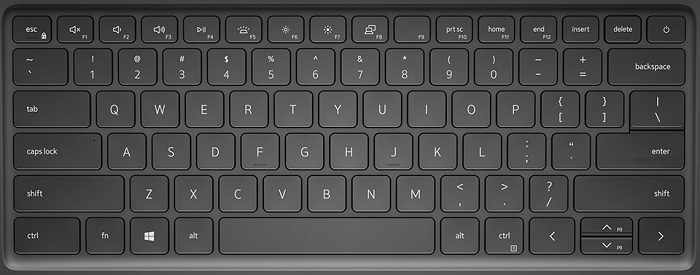
| Function key combo | Result | Secondary Behavior |
|---|---|---|
| Fn + F1 | Mute Audio | F1 |
| Fn + F2 | Decrease Volume | F2 |
| Fn + F3 | Increase Volume | F3 |
| Fn + F4 | Play/Pause | F4 |
| Fn + F5 | Toggle Keyboard Backlight (Optional) | F5 |
| Fn + F6 | Decrease Brightness | F6 |
| Fn + F7 | Increase Brightness | F7 |
| Fn + F8 | Switch to External Display | F8 |
| Fn + F10 | PrtScr | F10 |
| Fn + F11 | Home | F11 |
| Fn + F12 | End | F12 |
| Fn + Esc | Toggle Fn-Key Lock | Escape |
| Fn + Up (Arrow) Cursor | Page Up | Up Cursor |
| Fn + Down (Arrow) Cursor | Page Down | Down Cursor |
Lisätietoja
 Visit our Keyboard knowledge base for additional resources and information.
 For additional articles and information visit our Touchpad support page.
 Additional articles and information can also be found on our Mouse support page.
Tuotteet, joihin vaikutus kohdistuu
Latitude 3420Artikkelin ominaisuudet
Artikkelin numero: 000185380
Artikkelin tyyppi: How To
Viimeksi muutettu: 18 heinäk. 2025
Versio: 2
Etsi vastauksia kysymyksiisi muilta Dell-käyttäjiltä
Tukipalvelut
Tarkista, kuuluuko laitteesi tukipalveluiden piiriin.