AppSync: Uploading .xml license file in UI receives error: Adding the license failed due to "Invalid license file"
Yhteenveto: Uploading .xml license file in UI receives error: Adding the license failed due to "Invalid license file".
Tämä artikkeli koskee tuotetta
Tämä artikkeli ei koske tuotetta
Tämä artikkeli ei liity tiettyyn tuotteeseen.
Tässä artikkelissa ei yksilöidä kaikkia tuoteversioita.
Oireet
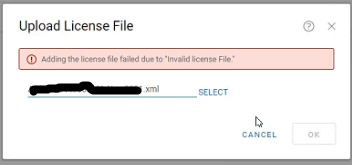
In AppSync UI, when uploading .xml license in Settings > License > Upload, receive an error:
Adding the license failed due to "Invalid license file"
Syy
The first scenario seen was the entire <lockingID> section was missing from the license file.
There should be a lockingID section like the following:
<LockingIds>

	<LockingId>

		<LockingIdCode>HOSTID</LockingIdCode>

		<LockingIdValue>value</LockingIdValue>

	</LockingId>

</LockingIds>
The second scenario seen was the LockingIdCode being inappropriately found to be XIOD like so:
<LockingId>

	<LockingIdCode>XIOID</LockingIdCode>
When it should be HOSTID
<LockingId>

	<LockingIdCode>HOSTID</LockingIdCode>
Tarkkuus
The internal licensing generation mechanism is updated to ensure the Locking ID section is populated.
A new license is needed. Obtain a new license from the licensing team.
Lisätietoja
AppSync 4.2 and later supports XML type licenses.
Tuotteet, joihin vaikutus kohdistuu
AppSyncArtikkelin ominaisuudet
Artikkelin numero: 000193800
Artikkelin tyyppi: Solution
Viimeksi muutettu: 10 syysk. 2025
Versio: 4
Etsi vastauksia kysymyksiisi muilta Dell-käyttäjiltä
Tukipalvelut
Tarkista, kuuluuko laitteesi tukipalveluiden piiriin.