OptiPlex 3000 Thin Client Secondary SSD Not Displayed in Boot Menu
Yhteenveto: User who purchase a Dell OptiPlex 3000 Thin Client unit with eMMC storage, and then install an SSD drive may not see the added storage in the F12 One-time Boot Menu.
Tämä artikkeli koskee tuotetta
Tämä artikkeli ei koske tuotetta
Tämä artikkeli ei liity tiettyyn tuotteeseen.
Tässä artikkelissa ei yksilöidä kaikkia tuoteversioita.
Oireet
Affected Products:
- OptiPlex 3000 Thin Client
An additional SSD drive will fail to appear in the F12 One-Time Boot Menu, after installation in an OptiPlex 3000 Thin Client.
Syy
Note: The OptiPlex 3000 Thin Client onboard storage and SSD devices are mutually exclusive.
Tarkkuus
The user must alter the enabled storage option in the system BIOS settings.
- Power on the computer and press F2 to enter BIOS setup.
- Select Storage on the left menu.
- Choose the M.2 PCIe SSD in the drop-down menu under Port Enablement.
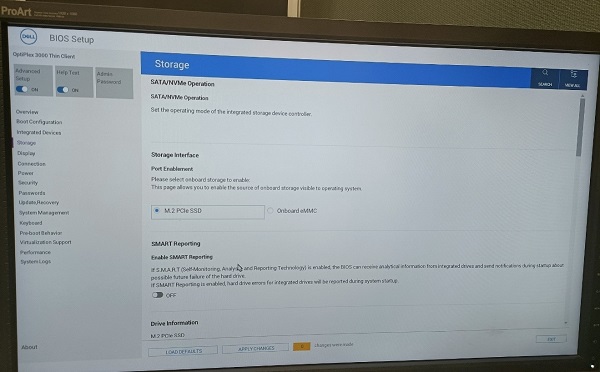
Figure 1: (English Only) Dell BIOS
- Select the APPLY CHANGES button and press OK to save the change.
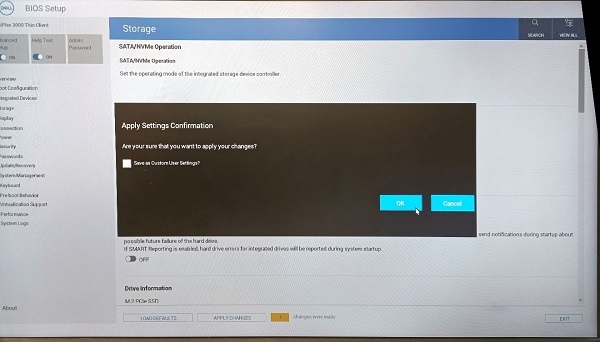
Figure 2: (English Only) Apply Changes and Press OK
- Select the EXIT button to exit BIOS setup.
Tuotteet, joihin vaikutus kohdistuu
OptiPlex 3000 Thin ClientArtikkelin ominaisuudet
Artikkelin numero: 000196679
Artikkelin tyyppi: Solution
Viimeksi muutettu: 13 toukok. 2026
Versio: 7
Etsi vastauksia kysymyksiisi muilta Dell-käyttäjiltä
Tukipalvelut
Tarkista, kuuluuko laitteesi tukipalveluiden piiriin.