AppSync: How to determine the version in use
Yhteenveto: How to determine the version of AppSync in use.
Tämä artikkeli koskee tuotetta
Tämä artikkeli ei koske tuotetta
Tämä artikkeli ei liity tiettyyn tuotteeseen.
Tässä artikkelissa ei yksilöidä kaikkia tuoteversioita.
Ohjeet
To determine the current version of AppSync software in use, follow one of the methods listed below:
AppSync UI:
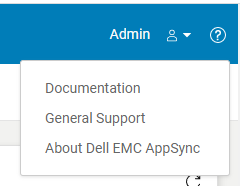
Fig.2
AppSync Logs:
Note: The version of AppSync displayed in "Control Panel\Programs\Programs and Features" is not sufficient as it does not confirm whether AppSync hotfixes have been installed.
AppSync UI:
- Open the AppSync UI and login.
- Click on "?" in the top right of the window. (Fig.1)
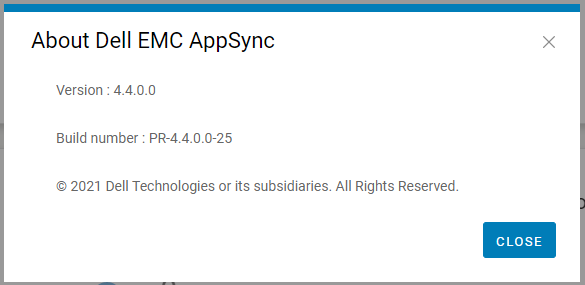
- Click on "About Dell EMC Appsync". (Fig.2)
- Quote this version and build number displayed to Dell AppSync technical support.
Fig.2
AppSync Logs:
- On the AppSync server, navigate to the logs directory in the install location (typically C:\EMC\AppSync\jboss\logs).
- Open server.log using a text editor.
- The first two line indicates the version of AppSync in use and whether any hotfixes are installed.
e.g. Sample server.log snippet (version = 4.3.0.0 & hotfix 3315_R1 is installed)
The current version of AppSync Server is 4.3.0.0_3315_R1
4. Quote this version and hotfix status displayed to Dell AppSync technical support.
The current version of AppSync Server is 4.3.0.0_3315_R1
Note: The version of AppSync displayed in "Control Panel\Programs\Programs and Features" is not sufficient as it does not confirm whether AppSync hotfixes have been installed.
Tuotteet, joihin vaikutus kohdistuu
AppSync, AppSyncArtikkelin ominaisuudet
Artikkelin numero: 000199464
Artikkelin tyyppi: How To
Viimeksi muutettu: 14 toukok. 2026
Versio: 7
Etsi vastauksia kysymyksiisi muilta Dell-käyttäjiltä
Tukipalvelut
Tarkista, kuuluuko laitteesi tukipalveluiden piiriin.