NVIDIA RTX Desktop Manager Keeps Desktop Open
Yhteenveto: This article provides information about the NVIDIA RTX desktop manager newly created Desktop cannot be closed issue.
Tämä artikkeli koskee tuotetta
Tämä artikkeli ei koske tuotetta
Tämä artikkeli ei liity tiettyyn tuotteeseen.
Tässä artikkelissa ei yksilöidä kaikkia tuoteversioita.
Oireet
Dell computers with NVIDIA discrete GPU might experience the NVIDIA RTX Desktop Manager cannot close the newly created desktop.
- Open NVIDIA RTX Desktop Manager and click ENABLE RTX DESKTOP MANAGER, the application creates Desktop 1 as default.
- Click the Button New Desktop to create a second desktop.
- Click the X icon on the right top corner of Desktop 2 but find that it cannot be closed.
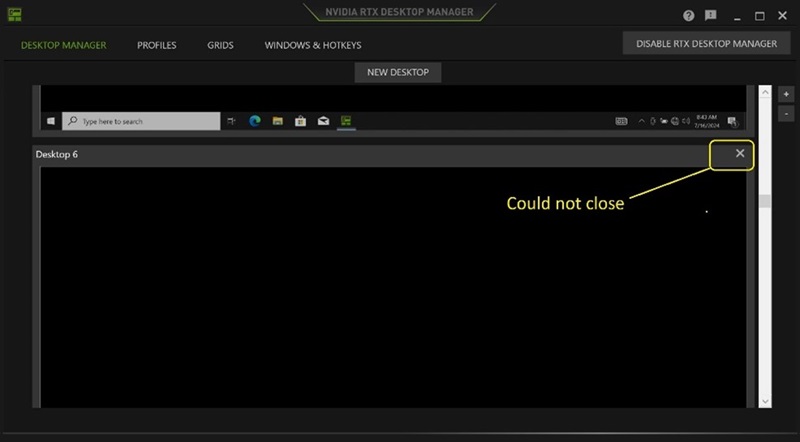
(Figure 1 - NVIDIA RTX Desktop Manager)
Affected Platforms:
- Precision 7780
- Precision 7680
- Precision 7770
- Precision 7670
- Precision 7560
- Precision 7760
- Precision 7550
- Precision 7750
- Precision 7540
- Precision 7740
- Precision 7530
- Precision 7730
- Precision 7520
- Precision 7720
- Precision 5480
- Precision 5490
- Latitude 3490
- Latitude 3480
- Latitude 3470
- Latitude 3550
- Latitude 3530
- Latitude 3520
Syy
N/A
Tarkkuus
Updating the NVIDIA Graphic Driver to version 552.84 or later on the computer resolves the issue. To download and install the driver, reference How to Download and Install Dell Drivers.
Tuotteet, joihin vaikutus kohdistuu
Dell Latitude 3480/3488, Latitude 3490, Latitude 3520, Latitude 3530, Latitude 3550, Latitude 3470, Precision 5480, Precision 5490, Precision 7520, Precision 7530, Precision 7540, Precision 7550, Precision 7560, Precision 7670, Precision 7680
, Precision 7720, Precision 7730, Precision 7740, Precision 7750, Precision 7760, Precision 7770, Precision 7780
...
Artikkelin ominaisuudet
Artikkelin numero: 000227614
Artikkelin tyyppi: Solution
Viimeksi muutettu: 21 toukok. 2026
Versio: 3
Etsi vastauksia kysymyksiisi muilta Dell-käyttäjiltä
Tukipalvelut
Tarkista, kuuluuko laitteesi tukipalveluiden piiriin.