Rugged Control Center Microphone Status Is Not in Sync with System Microphone
Yhteenveto: This article provides information about the Rugged Control Center (RCC) Microphone status is not synchronized with System Microphone.
Tämä artikkeli koskee tuotetta
Tämä artikkeli ei koske tuotetta
Tämä artikkeli ei liity tiettyyn tuotteeseen.
Tässä artikkelissa ei yksilöidä kaikkia tuoteversioita.
Oireet
When you Mute or Unmute the microphone from Windows settings, RCC is unable to switch the microphone status dynamically on the feature list UI page. When it is switch from RCC, Windows settings microphone status is getting updated.
You cannot see the microphone status getting switch in RCC when it is changed from the windows settings.
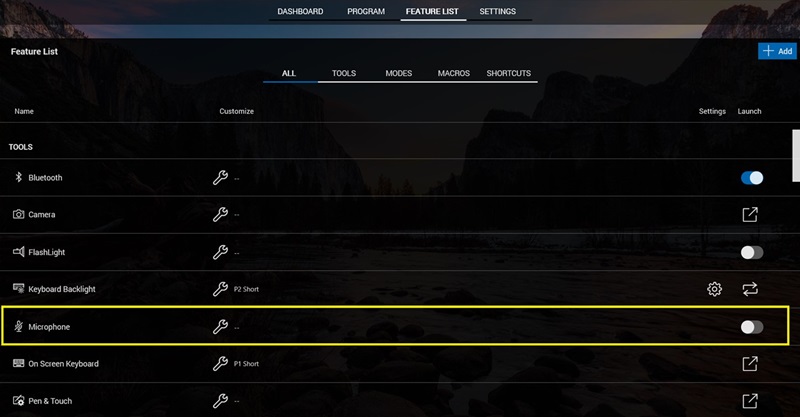
(Figure 1 - Rugged Control Center)
Affected Product:
- Rugged Control Center (RCC) All Versions
Affected Systems:
- Latitude Rugged 5420
- Latitude Rugged 5424
- Latitude Rugged Extreme 7424
- Latitude Rugged Extreme 7212
- Latitude Rugged Extreme 7414
- Latitude Rugged 5414
- Latitude Rugged Extreme 7214
- Latitude Rugged Extreme 7220
- Latitude Rugged Extreme 7230
- Latitude Rugged 5430
- Latitude Rugged Extreme 7330
- Latitude Rugged Extreme 7030
Syy
There are no APIS or events generated when microphone status is changed from window settings. The RCC is not able to detect and change the microphone status dynamically.
Tarkkuus
Restart the Rugged Control Center to sync with the windows settings and microphone status.
Tuotteet, joihin vaikutus kohdistuu
Latitude 7030 Rugged Extreme Tablet, Latitude 7212 Rugged Extreme Tablet, Latitude 7214 Rugged Extreme, Latitude 7220 Rugged Extreme Tablet, Latitude 7230 Rugged Extreme Tablet, Latitude 7330 Rugged Extreme, Latitude 5414 Rugged
, Latitude 5420 Rugged, Latitude 5424 Rugged, Latitude 5430 Rugged, Latitude 7414 Rugged, Latitude 7424 Rugged Extreme, Rugged Control Center
...
Artikkelin ominaisuudet
Artikkelin numero: 000227750
Artikkelin tyyppi: Solution
Viimeksi muutettu: 22 huhtik. 2025
Versio: 2
Etsi vastauksia kysymyksiisi muilta Dell-käyttäjiltä
Tukipalvelut
Tarkista, kuuluuko laitteesi tukipalveluiden piiriin.