Risoluzione dei problemi di danneggiamento del database SQL Server da parte di DBCC CHECKDB
Résumé: DBCC CHECKDB, DBCC, riparazione del database, database, database danneggiato
Cet article concerne
Cet article ne concerne pas
Cet article n’est associé à aucun produit spécifique.
Toutes les versions du produit ne sont pas identifiées dans cet article.
Symptômes
Problema: Il database MS SQL Server è danneggiato e deve essere riparato per mantenere stabilità e coerenza.
Cause
Danneggiamento del software nel database, nei log e nei file delle applicazioni di MS SQL Server.
Résolution
DBCC è uno strumento nativo di Microsoft SQL Server progettato per controllare e ripristinare i database Microsoft SQL Server. Questo articolo descrive il comando DBCC CHECKDB e le opzioni per il controllo dell'integrità fisica e logica del database.
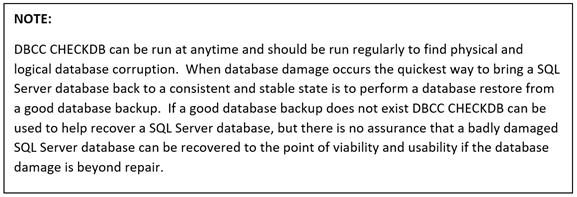
DBCC CHECKDB (Transact-SQL):

Procedura per eseguire DBCC CHECKDB:
- Aprire SQL Server Studio Management
- Aprire una finestra di query
- Digitare "DBCC CHECKDB (Database Name)"
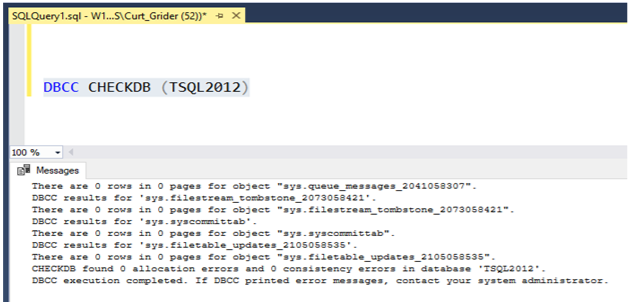
4. Controllare nella parte inferiore dei risultati della query gli errori di allocazione e coerenza.
5. Se vengono visualizzati errori di allocazione e coerenza nei risultati, il database deve essere ripristinato dal backup o eseguire un ripristino del database utilizzando DBCC CHECKDB.
Opzioni di ripristino DBCC
- REPAIR_REBUILD: Il comando riportato di seguito imposta il database in una modalità che consente la riparazione.
USE Master;
GO
ALTER DATABASE TSQL2012
SET SINGLE_USER
WITH ROLLBACK IMMEDIATE;
GO
DBCC CHECKDB (TSQL2012, REPAIR_REBUILD)
GO
ALTER DATABASE TSQL2012
SET MULTI_USER;
GO
Copiare il comando riportato di seguito e incollare nella sessione di query inserendo il nome del database corretto:
--Command below performs a Database repair not allowing Data loss

USE Master;
GO
ALTER DATABASE TSQL2012
SET SINGLE_USER
WITH ROLLBACK IMMEDIATE;
GO
DBCC CHECKDB (TSQL2012,REPAIR_REBUILD)
GO
ALTER DATABASE TSQL2012
SET MULTI_USER;
GO
2. REPAIR_ALLOW_DATA_LOSS: Il comando seguente esegue la riparazione del database e potrebbe causare la perdita di dati per completare il processo di riparazione.
--Command below performs a database repair that may result in data loss,
 --replace TSQL2012 with the database name of database being repaired
USE Master
GO
ALTER DATABASE TSQL2012
SET SINGLE_USER
WITH ROLLBACK IMMEDIATE
GO
DBCC CHECKDB (TSQL2012, REPAIR_ALLOW_DATA_LOSS)
GO
ALTERDATABASE TSQL2012
SET MULTI_USER
GO
Copiare il comando riportato di seguito e incollare nella sessione di query inserendo il nome del database corretto:
I comandi riportati di seguito sono utili se lo spazio su disco fisico del database è quasi esaurito.
--Command below estimates the size TEMPDB must be to complete the DBCC CHECKDB job
USE Master;
GO
ALTER DATABASE TSQL2012
SET SINGLE_USER
WITH ROLLBACK IMMEDIATE;
GO
DBCC CHECKDB (TSQL2012, REPAIR_REBUILD)
WITH ESTIMATEONLY;
GO
ALTER DATABASE TSQL2012
SET MULTI_USER
GO
Copiare il comando riportato di seguito e incollare nella sessione di query inserendo il nome del database corretto:
--Command below estimates the size TEMPDB must be to complete the DBCC CHECKDB job

USE Master;
GO
ALTER DATABASE TSQL2012
SET SINGLE_USER
WITH ROLLBACK IMMEDIATE;
GO
DBCC CHECKDB (TSQL2012, REPAIR_REBUILD)
WITH ESTIMATEONLY;
GO
ALTER DATABASE TSQL2012
SET MULTI_USER
GO
--Command below will run DBCC CHECKDB without using TEMDB and creating a DB
--snapshot. When not using TEMPDB with a DB snapshot all data will be checked in
-- the live database not not a database snapshot.

USE Master;
GO
ALTER DATABASE TSQL2012
SET SINGLE_USER
WITH ROLLBACK IMMEDIATE;
GO
DBCC CHECKDB (TSQL2012, REPAIR_REBUILD)
WITH TABLOCK;
GO
ALTER DATABASE TSQL2012
SET MULTI_USER
GO
Copiare il comando riportato di seguito e incollare per eseguire una query sulla sessione e inserire il nome del database corretto:
--Command below will run DBCC CHECKDB without using TEMPDB and creating a DB
--snapshot. When not using TEMPDB with a DB snapshot all data will be checked in ---the live database not a database snapshot.

USE Master;
GO
ALTER DATABASE TSQL2012
SET SINGLE_USER
WITH ROLLBACK IMMEDIATE;
GO
DBCC CHECKDB (TSQL2012, REPAIR_REBUILD)
WITH TABLOCK;
GO
ALTER DATABASE TSQL2012
SET MULTI_USER
GO
Produits concernés
Dell Quickstart Data Warehouse Appliance, Prosupport for Microsoft SoftwarePropriétés de l’article
Numéro d’article: 000134529
Type d’article: Solution
Dernière modification: 30 avr. 2026
Version: 6
Trouvez des réponses à vos questions auprès d’autres utilisateurs Dell
Services de support
Vérifiez si votre appareil est couvert par les services de support.