Avamar: Przywracanie FLR VMware kończy się niepowodzeniem z błędem "avvmwfile Error <0000>: Nie można przywrócić plików za pośrednictwem sieci"
Résumé: . Avamar: Przywracanie FLR VMware kończy się niepowodzeniem z błędem "avvmwfile Error" <0000>: Nie można przywrócić plików za pośrednictwem sieci"
Cet article concerne
Cet article ne concerne pas
Cet article n’est associé à aucun produit spécifique.
Toutes les versions du produit ne sont pas identifiées dans cet article.
Symptômes
Przywracanie FLR do maszyny wirtualnej kończy się niepowodzeniem z następującymi błędami:
Lub ten curl Ret: 28
avvmwfile Error : Failed to restore files via network, check proxy log for details
avvmwfile Error : assist_restore error. ret: 157
Na serwerze proxy w następującym dzienniku:
/usr/local/avamarclient/bin/logs/VSphereWebService.logPokaż ten błąd curl: CURL Ret: 7
[VWS - DEBUG] TID=1959 MID=161118: summary.config.vmPathName = [datastore] vmname/vmname.vmx
[VWS - DEBUG] TID=140595754436519 MID=161279: HTTP PUT: Source = /usr/local/avamarclient/bin/BatchDownload.exe
[VWS - DEBUG] TID=140595754436519 MID=161280: HTTP PUT: Target = D:\Users\Administrator\BatchDownload.exe
[VWS - DEBUG] TID=140595754436519 MID=161281: HTTP PUT: Url = https://esxihostname.example.com:443/guestFile?id=2&token=52f03e19-6b09-94c6-35b8-a8a21cb401f62
[VWS - DEBUG] TID=140595754436519 MID=161282: HTTP PUT: Cert =
[VWS - DEBUG] TID=140595754436519 MID=161283: HTTP PUT: DisableSkipHost = false
[VWS - DEBUG] TID=18446744069414586280 MID=161441: CURL Ret: 7, HTTP Ret: 0
Lub ten curl Ret: 28
[VWS - DEBUG] TID=18446744069414586280 MID=161441: CURL Ret: 28, HTTP Ret: 0
Cause
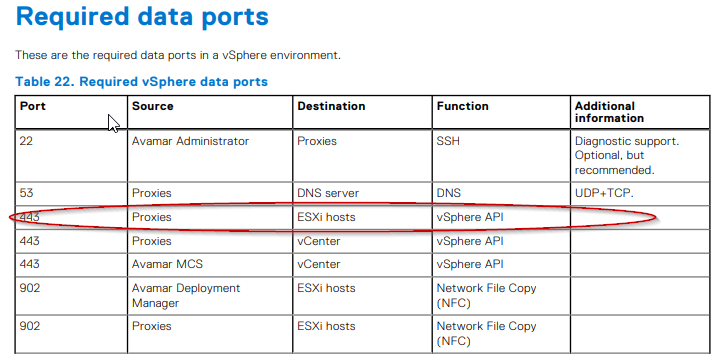
Jest to problem z zaporą sieciową. Funkcja przywracania na poziomie pliku wymaga otwarcia protokołu TCP 443 między serwerem proxy Avamar a serwerem ESXi maszyny docelowej. Ten wymóg został udokumentowany w przewodniku Avamar VMware
Résolution
Należy zaangażować zespół sieci klienta i sprawdzić, czy port jest otwarty zgodnie z dokumentacją.
Aby otworzyć port testowy, na serwerze proxy Avamar można wystosować następujące polecenie:
Przykładowe dane wyjściowe nie powiodły się:
Przykładowe dane wyjściowe:
Aby otworzyć port testowy, na serwerze proxy Avamar można wystosować następujące polecenie:
curl -kv https://esxihostname.example.com/
Przykładowe dane wyjściowe nie powiodły się:
198proxy:/home/admin # curl -kv https://esxihostname.example.com:443  && echo sucess || echo failed
* Rebuilt URL to: https://1.2.3.4:443/
*   Trying 1.2.3.4...
* TCP_NODELAY set
* connect to 1.2.3.4 port 443 failed: Connection refused
* Failed to connect to 1.2.3.4 port 443: Connection refused
* Closing connection 0
curl: (7) Failed to connect to 1.2.3.4 port 443: Connection refused
failed
Przykładowe dane wyjściowe:
198proxy:/home/admin # curl -kv https://10.240.196.10:443 2>/dev/null && echo sucess || echo failedsucess
Produits concernés
AvamarPropriétés de l’article
Numéro d’article: 000209737
Type d’article: Solution
Dernière modification: 26 Jun 2023
Version: 3
Trouvez des réponses à vos questions auprès d’autres utilisateurs Dell
Services de support
Vérifiez si votre appareil est couvert par les services de support.