NetWorker:新しいクライアントの作成が「is not a valid hostname as it cannot be resolved in DNS」というメッセージで完了しない
Résumé: NetWorker 19.7.0.3の[New Client Properties]を使用してクライアントを追加しても完了せず、「Name is not a valid hostname as it cannot be resolved in DNS. DNSまたはホスト ファイルに追加し、NetWorkerサーバーのDNSキャッシュ(dbgcommand -p FlushDnsCache)をフラッシュしてください。 ...
Cet article concerne
Cet article ne concerne pas
Cet article n’est associé à aucun produit spécifique.
Toutes les versions du produit ne sont pas identifiées dans cet article.
Symptômes
NetWorker 19.7.0.3の [New Client Properties ]を使用してクライアントを追加しても完了せず、次のエラーが表示されます。
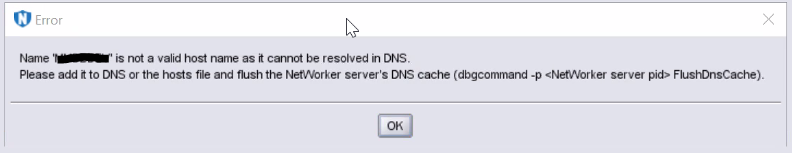
図1: エラー メッセージのスクリーンショット
Name  is not a valid host name as it cannot be resolved in DNS.
Please add it to DNS or the hosts file and flush the NetWorker server's DNS cache (dbgcommand -p  FlushDnsCache).
図1: エラー メッセージのスクリーンショット
Cause
ホスト名は、DNSまたは「hosts」ファイルを介して名前解決に失敗します。
ホスト名が解決された場合でも、このエラー メッセージが以前に発生した場合、NetWorker DNSキャッシュはクライアントの追加を禁止します。
Résolution
クライアントホスト名をDNSに追加するか(正引きと逆のエントリー)、または次の形式で「hosts」ファイルに追加します。
IP Address [space/tab] FQDN [space/tab] Short Name
NetWorker DNSキャッシュを「フラッシュ」するには、次の手順に従います。
- 以下のコマンドを使用して、「nsrd」および「nsrexecd」プロセスのPIDを取得します。
Windowsの場合:
tasklist | findstr nsrd.exe
tasklist | findstr nsrexecd.exe
Linuxの場合
ps -e | grep nsrd
ps -e | grep nsrexecd
- 「nsrd」と「nsrexecd」のPIDに対して次のコマンドを実行し、次のようにスイッチを使用します。
dbgcommand -p FlushDnsCache
Propriétés de l’article
Numéro d’article: 000212659
Type d’article: Solution
Dernière modification: 29 juin 2023
Version: 3
Trouvez des réponses à vos questions auprès d’autres utilisateurs Dell
Services de support
Vérifiez si votre appareil est couvert par les services de support.