Dell Encryption Agent Reporting a Different Hostname in Dell Data Security Server Console
Summary: This article provides steps to correct an issue with inventory reporting as the wrong hostname with Windows clients.
Ez a cikk a következő(k)re vonatkozik:
Ez a cikk nem vonatkozik a következő(k)re:
Ez a cikk nem kapcsolódik egyetlen konkrét termékhez sem.
Ez a cikk nem azonosítja az összes termékverziót.
Symptoms
Affected Products:
- Dell Encryption
- Dell Endpoint Security Suite Enterprise
Affected Operating Systems:
- Windows
Cause
Dell Data Security products can report the wrong hostname during inventory uploads to the server if there is a different hostname in the hosts file before the current hostname.
Resolution
- Edit the hosts file located at C:\Windows\System32\drivers\etc.
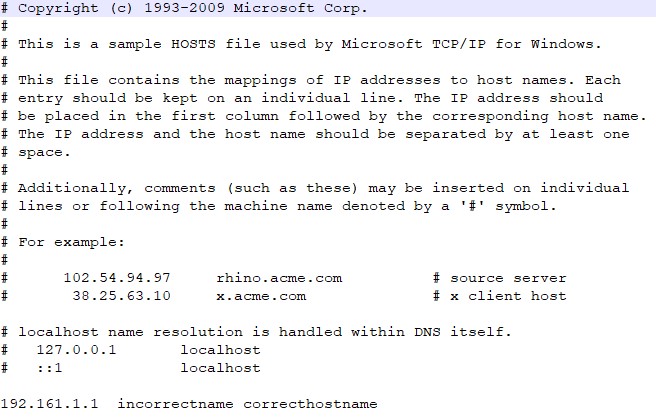
- Change the order to reflect the current hostname to be the first entry in the hosts file.

Note: You can still have other aliases in the hosts file that have to be after the current hostname.
- When finished, click File > Save.
- The hostname will change within the server upon the next inventory upload.
To contact support, reference Dell Data Security International Support Phone Numbers.
Go to TechDirect to generate a technical support request online.
For additional insights and resources, join the Dell Security Community Forum.
Érintett termékek
Dell Encryption, Dell Endpoint Security Suite EnterpriseTermék tulajdonságai
Article Number: 000187320
Article Type: Solution
Utoljára módosítva: 20 máj. 2024
Version: 4
Választ kaphat kérdéseire más Dell-felhasználóktól
Támogatási szolgáltatások
Ellenőrizze, hogy a készüléke rendelkezik-e támogatási szolgáltatással.