NetWorker: Backup reports 'Warning <file> size grew during save'
Riepilogo: Backup succeeds but gets marked as failed in NMC. The failure message indicates: Error: 'Warning-'' size grew during save'.
Questo articolo si applica a
Questo articolo non si applica a
Questo articolo non è legato a un prodotto specifico.
Non tutte le versioni del prodotto sono identificate in questo articolo.
Sintomi
Backup succeeds but gets marked as failed in NMC. The failure message indicates: Error: 'Warning-'<file-name>' size grew during save'.
129292:save: Successfully established Client direct save session for save-set ID '3634349703' (nw_client_name:/dir) with Data Domain volume 'DataDomain.001'.
nw_client_name: /dir level=incr, 117 MB 00:00:03 8 files
completed savetime=1503641693
94694:save: The backup of save set '/dir' succeeded.
--- Job Indications ---
Warning: `/dir/some_file' size grew during save
Expected 59674974 bytes for `/dir/some_file', got 59680075 bytes
nw_client_name:/dir: retried 1 times.
Causa
This is expected behavior. This warning appears when any file has a large change rate during the backup session; for example, logs.
Risoluzione
This is a WARNING, not a FAILURE. The warning can be mitigated by applying logasm to the directory/file in a NetWorker directive.
logasm enables file changes during backup sessions. logasm can be used for log files and other similar files where a file changing during a backup operation is not noteworthy.
Setting logasm on a specific directory/file does not resolve the warning for all directories/files on the client, but it can be set recursively on a directory tree. Create a separate logasm for each directory/file path if it is not part of an already specified directory tree within a recursive logasm. Apply this directive to each client that reports this warning once configured.
Directives can be created in the NetWorker Management Console (NMC) under Server-->Directives.
Examples:
To apply logasm, on one specific directory (only files in the directory specified have logasm performed):
<< /var >>
logasm: *.*
To apply logasm, recursively to a directory (all directories from the directory specified down have logasm performed):
<< /var >>
+logasm: *.*
Once the directive is configured, it can be added in the client properties:
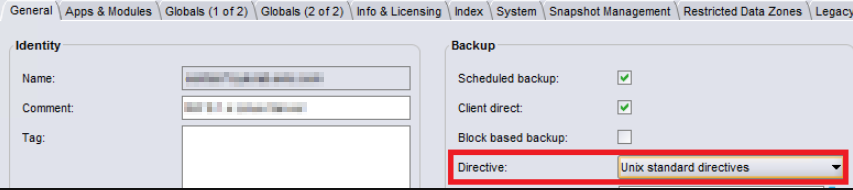
For more information about directives and other maintenance commands, see the NetWorker Administrator and NetWorker Command Reference Guides available through: https://www.dell.com/support/home/product-support/product/networker/docs
Prodotti interessati
NetWorkerProdotti
NetWorkerProprietà dell'articolo
Numero articolo: 000050052
Tipo di articolo: Solution
Ultima modifica: 17 apr 2026
Versione: 6
Trova risposta alle tue domande dagli altri utenti Dell
Support Services
Verifica che il dispositivo sia coperto dai Servizi di supporto.