Come iscriversi alle avvertenze tecniche Dell (DTA) e alle avvertenze di sicurezza Dell (DSA)
Riepilogo: Come abbonarsi o annullare la sottoscrizione ai DTA o DSA Dell.
Questo articolo si applica a
Questo articolo non si applica a
Questo articolo non è legato a un prodotto specifico.
Non tutte le versioni del prodotto sono identificate in questo articolo.
Istruzioni
Dell Technologies emette avvisi per i prodotti Dell al fine di notificare i problemi critici e il potenziale impatto sul loro ambiente. Impostare notifiche e-mail automatiche ogni volta che viene emessa un'avvertenza tecnica o di sicurezza Dell o solo quando viene emessa un'avvertenza per un prodotto specifico.
Per la procedura di correzione di un avviso, consultare Gestione delle avvertenze tecniche e di sicurezza in MyService360. È necessario effettuare l'accesso per MyService360.
1. Accedere a https://www.dell.com/support.
2. Nell'angolo in alto a destra, posizionare il puntatore del mouse e cliccare su Preferenze Dell. Viene visualizzata la pagina Impostazionie preferenze .
3. Cliccare sulla scheda NOTIFICHE E AVVISI, quindi cliccare sulla scheda Avvisi sui prodotti .
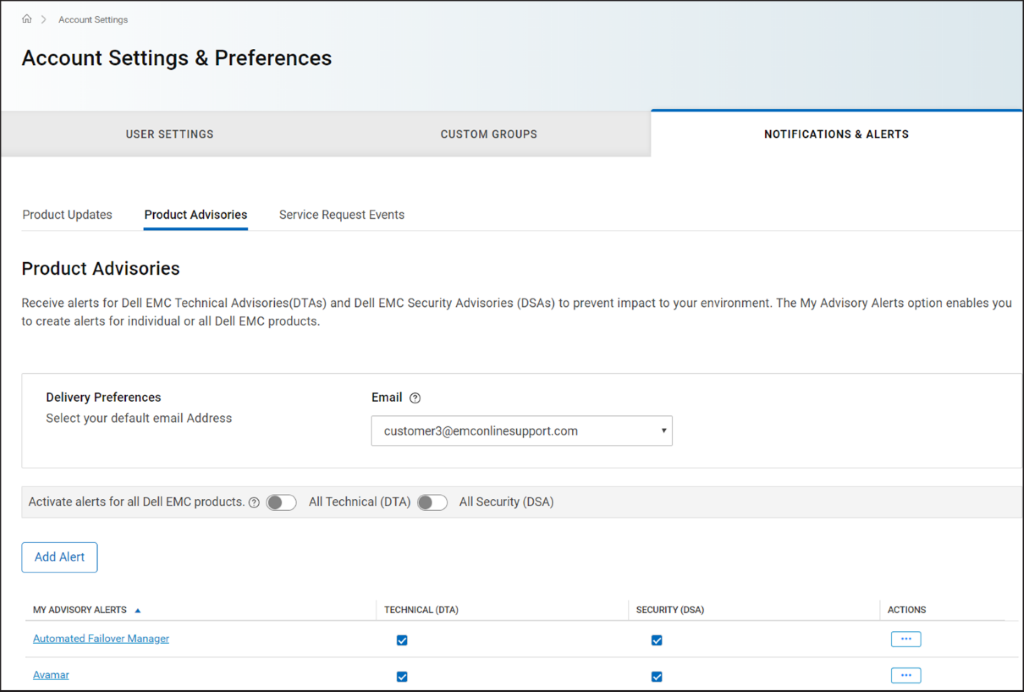
Figura 1 Scheda
Avvertenze sui prodotti 4. Nel riquadro Preferenze di consegna , selezionare l'indirizzo e-mail a cui si desidera ricevere le notifiche.
5. Per ricevere notifiche e-mail ogni volta che viene emesso un avviso, effettuare le seguenti operazioni:
NOTA: Per impostazione predefinita, vengono inviate notifiche e-mail sia per le avvertenze tecniche che per quelle sulla sicurezza. A seconda delle proprie esigenze, è possibile deselezionare le caselle di controllo nelle colonne TECHNICAL (DTA) o SECURITY (DSA).
Per la procedura di correzione di un avviso, consultare Gestione delle avvertenze tecniche e di sicurezza in MyService360. È necessario effettuare l'accesso per MyService360.
1. Accedere a https://www.dell.com/support.
2. Nell'angolo in alto a destra, posizionare il puntatore del mouse e
cliccare su Preferenze Dell. Viene visualizzata la pagina Impostazionie preferenze .
3. Cliccare sulla scheda NOTIFICHE E AVVISI, quindi cliccare sulla scheda Avvisi sui prodotti .
Figura 1 Scheda
Avvertenze sui prodotti 4. Nel riquadro Preferenze di consegna , selezionare l'indirizzo e-mail a cui si desidera ricevere le notifiche.
5. Per ricevere notifiche e-mail ogni volta che viene emesso un avviso, effettuare le seguenti operazioni:
- Per le avvertenze tecniche, attivare l'interruttore Per tutte le informazioni tecniche (DTA).
- Per le avvertenze di sicurezza, attivare l'interruttore DSA (All Security ).
- Cliccare su Add Alert.
- Inserire un nome di prodotto e cliccare su Add Product.
- L'avviso viene creato e visualizzato nella pagina Avvisi sui prodotti .
Proprietà dell'articolo
Numero articolo: 000113250
Tipo di articolo: How To
Ultima modifica: 18 apr 2026
Versione: 8
Trova risposta alle tue domande dagli altri utenti Dell
Support Services
Verifica che il dispositivo sia coperto dai Servizi di supporto.