PowerEdge: Sådan installeres Windows Server Backup ved hjælp af PowerShell
Riepilogo: Sådan installeres Windows Server Backup ved hjælp af PowerShell til Windows Server. Følg disse trin for at installere og administrere serversikkerhedskopier effektivt.
Questo articolo si applica a
Questo articolo non si applica a
Questo articolo non è legato a un prodotto specifico.
Non tutte le versioni del prodotto sono identificate in questo articolo.
Istruzioni
- For at starte Windows PowerShell skal du indtaste kommandopromptvinduet
Start PowerShell - Sådan installeres Windows Server-sikkerhedskopieringstype
Install-WindowsFeature Windows-Server-Backup
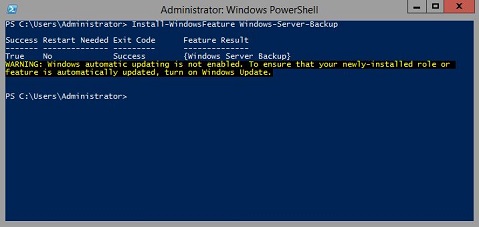
Yderligere oplysninger:
Windows Serversikkerhedskopieringhttps://learn.microsoft.com/en-us/previous-versions/windows/it-pro/windows-server-2012-r2-and-2012/jj614621(v=ws.11)

Windows Server-sikkerhedskopiering Windows PowerShell-cmdlet'erhttps://learn.microsoft.com/en-us/powershell/module/windowsserverbackup/?view=windowsserver2022-ps
Prodotti interessati
Microsoft Windows 2012 Server, Microsoft Windows 2012 Server R2Prodotti
C Series, HS Series, Modular Infrastructure, Rack Servers, Tower Servers, XE Servers, XR Servers, OEM Server Solutions, Microsoft Windows Server 2016, Microsoft Windows Server 2019, Microsoft Windows Server 2022, Microsoft Windows 2008 Server R2
, Microsoft Windows 2008 Server Service Pack 2, Microsoft Windows 2012 Server, Microsoft Windows 2012 Server R2
...
Proprietà dell'articolo
Numero articolo: 000122393
Tipo di articolo: How To
Ultima modifica: 05 set 2025
Versione: 9
Trova risposta alle tue domande dagli altri utenti Dell
Support Services
Verifica che il dispositivo sia coperto dai Servizi di supporto.