Dell Security Management Server를 제거하는 방법
Riepilogo: 다음 지침에 따라 Dell Security Management Server 또는 Dell Data Protection Enterprise Edition Server를 제거하는 방법을 알아보십시오.
Questo articolo si applica a
Questo articolo non si applica a
Questo articolo non è legato a un prodotto specifico.
Non tutte le versioni del prodotto sono identificate in questo articolo.
Istruzioni
Dell Security Management Server(이전 Dell Data Protection Enterprise Edition Server)는 다음 작업을 위해 제거가 필요할 수 있습니다.
- 제품 문제 해결
- 운영 체제 비호환성 문제 해결
- 서버 마이그레이션
이 문서에서는 제품을 제거하는 단계에 대해 설명합니다.
영향을 받는 제품:
- Dell Security Management Server
- Dell Data Protection Enterprise Edition Server
영향을 받는 버전:
- 8.0.0 이상
영향을 받는 운영 체제:
- Windows
Dell Security Management Server의 제거는 버전에 따라 다릅니다.
특정 단계에 해당하는 버전을 클릭하십시오. 버전 관리에 대한 자세한 내용은 Dell Data Security Server 버전을 식별하는 방법을 참조하십시오.
경고: 제거하기 전에 Dell Security Management Server를 백업해야 합니다. 백업 수행에 대한 자세한 내용은 Dell Security Management Server를 백업 및 복원하는 방법을 참조하십시오.
버전 9.8.0 이상
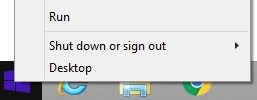
- 관리자로 Windows 시작 메뉴를 마우스 오른쪽 버튼으로 클릭한 다음 Run을 클릭합니다.
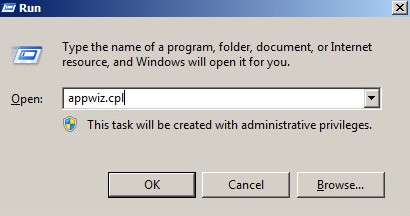
- Run UI에서 다음을 입력합니다.
appwiz.cpl. - 확인을 누릅니다.
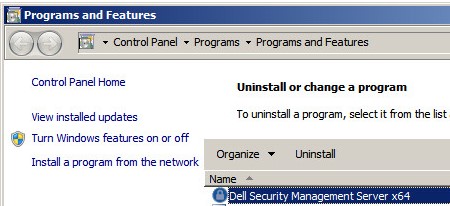
- 프로그램 및 기능에서 Dell Security Management Server x64를 두 번 클릭합니다.
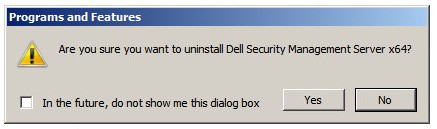
- Yes를 클릭합니다.
버전 8.3.0-9.7.0
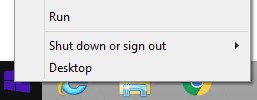
- 관리자로 Windows 시작 메뉴를 마우스 오른쪽 버튼으로 클릭한 다음 Run을 클릭합니다.
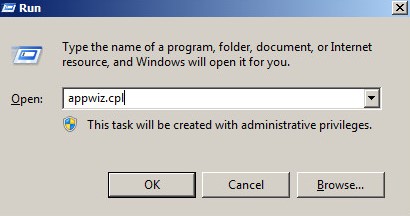
- Run UI에서 다음을 입력합니다.
appwiz.cpl. - 확인을 누릅니다. 그러면 프로그램 및 기능이 열립니다.
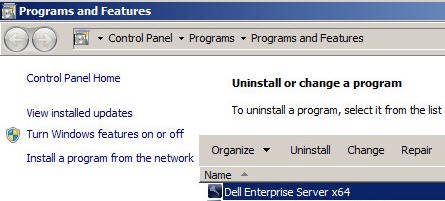
- Dell Enterprise Server x64 또는 Dell Enterprise Server x86을 두 번 클릭합니다.
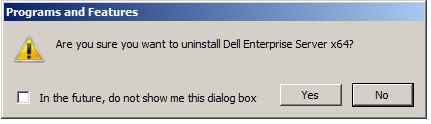
- Yes를 클릭합니다.
버전 8.0.0-8.1.0
- 관리자로 Windows 시작 메뉴를 마우스 오른쪽 버튼으로 클릭한 다음 Run을 클릭합니다.
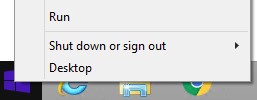
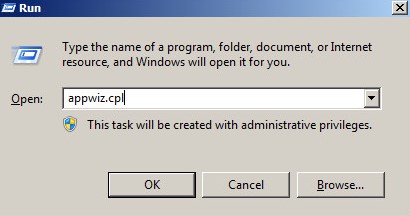
- Run UI에서
appwiz.cpl. - 확인을 누릅니다. 그러면 프로그램 및 기능이 열립니다.
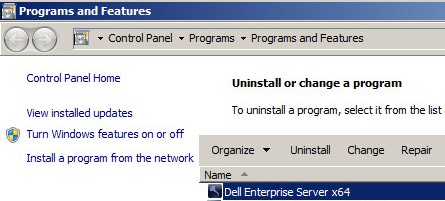
- Dell Enterprise Server x64 또는 Dell Enterprise Server x86을 두 번 클릭합니다.
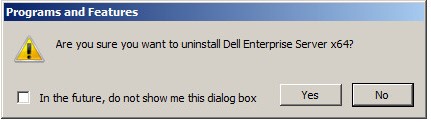
- Yes를 클릭합니다.
- OK를 클릭합니다.
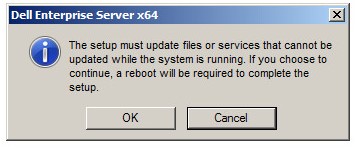
- Windows 서버를 재부팅합니다.
지원 부서에 문의하려면 Dell Data Security 국제 지원 전화번호를 참조하십시오.
온라인으로 기술 지원 요청을 생성하려면 TechDirect로 이동하십시오.
추가 정보 및 리소스를 보려면 Dell 보안 커뮤니티 포럼에 참여하십시오.
Informazioni aggiuntive
Video
Prodotti interessati
Dell EncryptionProprietà dell'articolo
Numero articolo: 000124927
Tipo di articolo: How To
Ultima modifica: 04 giu 2026
Versione: 16
Trova risposta alle tue domande dagli altri utenti Dell
Support Services
Verifica che il dispositivo sia coperto dai Servizi di supporto.