Come creare ruoli personalizzati di VMware Carbon Black Cloud
Riepilogo: Scopri come creare ruoli di amministratore personalizzati per VMware Carbon Black Cloud seguendo queste istruzioni dettagliate per Windows, Mac e Linux.
Questo articolo si applica a
Questo articolo non si applica a
Questo articolo non è legato a un prodotto specifico.
Non tutte le versioni del prodotto sono identificate in questo articolo.
Istruzioni
Questo articolo descrive come creare ruoli amministrativi personalizzati per VMware Carbon Black Cloud.
Prodotti interessati:
- VMware Carbon Black Cloud Endpoint
Sistemi operativi interessati:
- Windows
- Mac
- Linux
- In un web browser accedere a [REGION].conferdeploy.net.
[REGION] = regione del tenant
- Americhe = https://defense-prod05.conferdeploy.net/
- Europa = https://defense-eu.conferdeploy.net/
- Asia Pacifico = https://defense-prodnrt.conferdeploy.net/
- Australia e Nuova Zelanda: https://defense-prodsyd.conferdeploy.net
- Americhe = https://defense-prod05.conferdeploy.net/
- Accedere a VMware Carbon Black Cloud.

- Nel riquadro a sinistra, espandere Settings, quindi cliccare su Roles.
 il layout mostrato nell'esempio potrebbe essere leggermente diverso rispetto al proprio ambiente.
 - In alto a destra, cliccare su Add Role.

- Nel menu Add Role:
- Compilare il campo Role name.
- Popolare il campo Description.
- Facoltativamente, è possibile copiare le autorizzazioni da un altro ruolo.
- Controllare le autorizzazioni appropriate.
- Cliccare su Save.
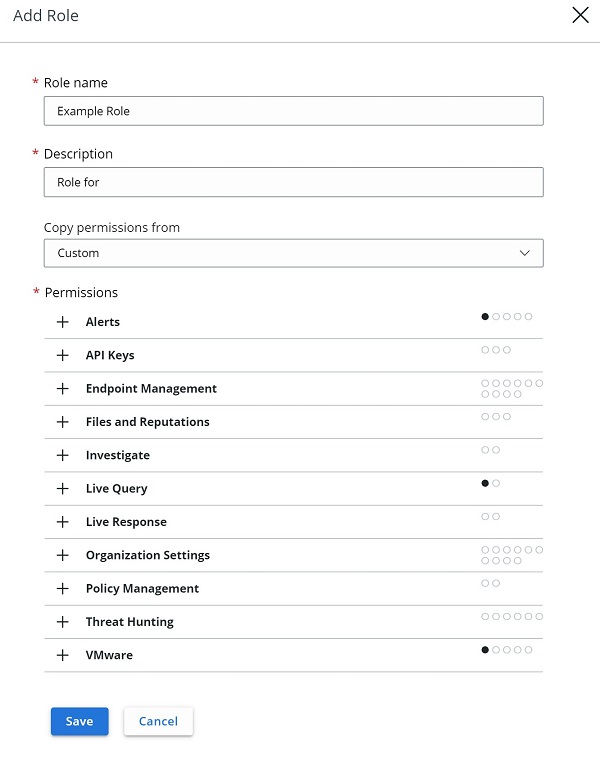 gli esempi utilizzati nello screenshot possono differire nell'ambiente in uso.

Informazioni aggiuntive
Video
Prodotti interessati
VMware Carbon BlackProprietà dell'articolo
Numero articolo: 000126081
Tipo di articolo: How To
Ultima modifica: 28 lug 2026
Versione: 13
Trova risposta alle tue domande dagli altri utenti Dell
Support Services
Verifica che il dispositivo sia coperto dai Servizi di supporto.